基于 LangChain4j 的文件名 AI 翻译助手:从设计到实现的全流程指南
在日常工作中,我们经常会遇到大量英文文件名的文件需要整理,手动翻译不仅效率低下,还容易出现不一致的问题。本文将介绍如何使用 Java 结合 LangChain4j 框架开发一款文件名 AI 翻译助手,实现批量翻译、自动过滤含中文文件、配置管理等功能,帮助你高效处理多语言文件命名问题。
项目背景与核心功能
为什么需要文件名翻译助手?
-
程序员整理英文技术文档时,需要统一为中文命名便于检索
-
研究人员处理大量英文文献时,批量翻译可提升管理效率
-
多语言环境工作者需要快速统一文件命名规范
核心功能特点
-
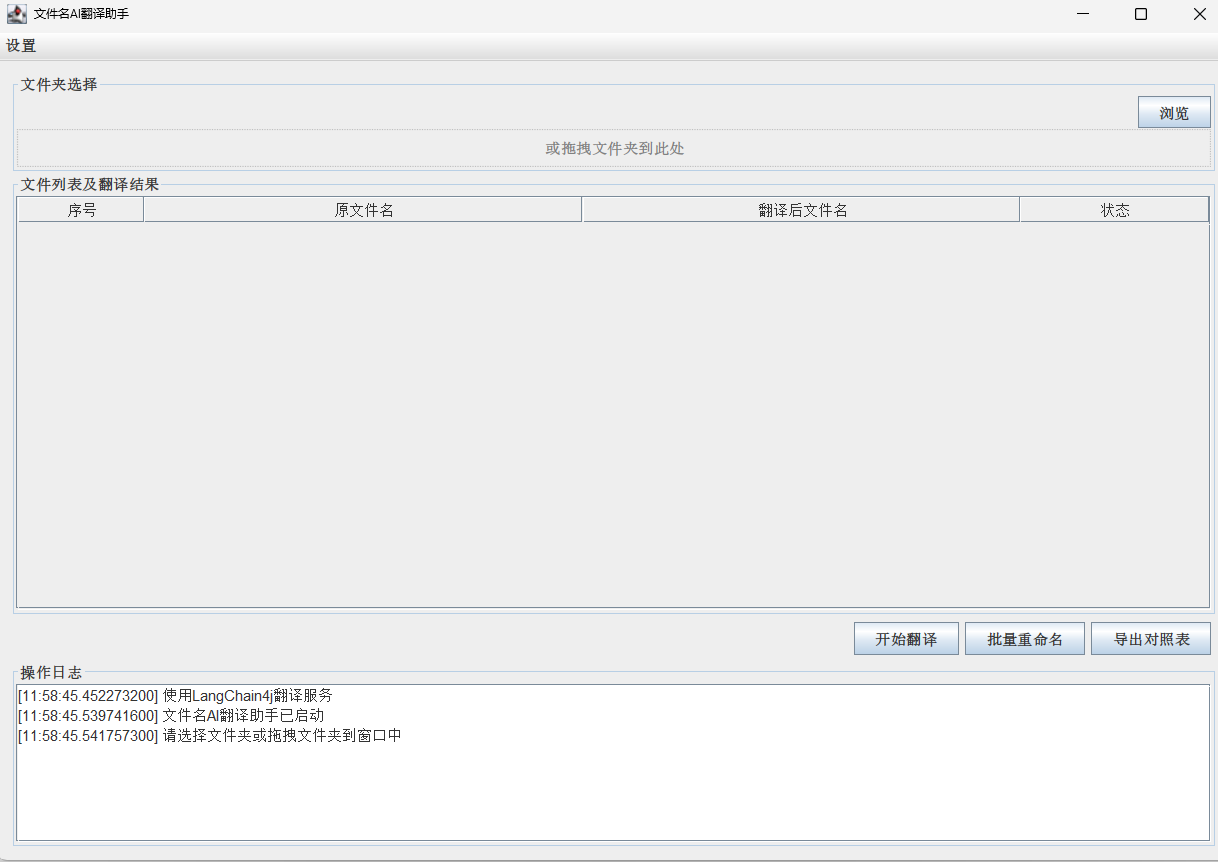
支持文件夹拖拽和手动选择两种输入方式
-
自动过滤已包含中文的文件,避免重复翻译
-
基于 LangChain4j 框架集成主流 AI 模型(GPT-4o、GLM-4.5 等)
-
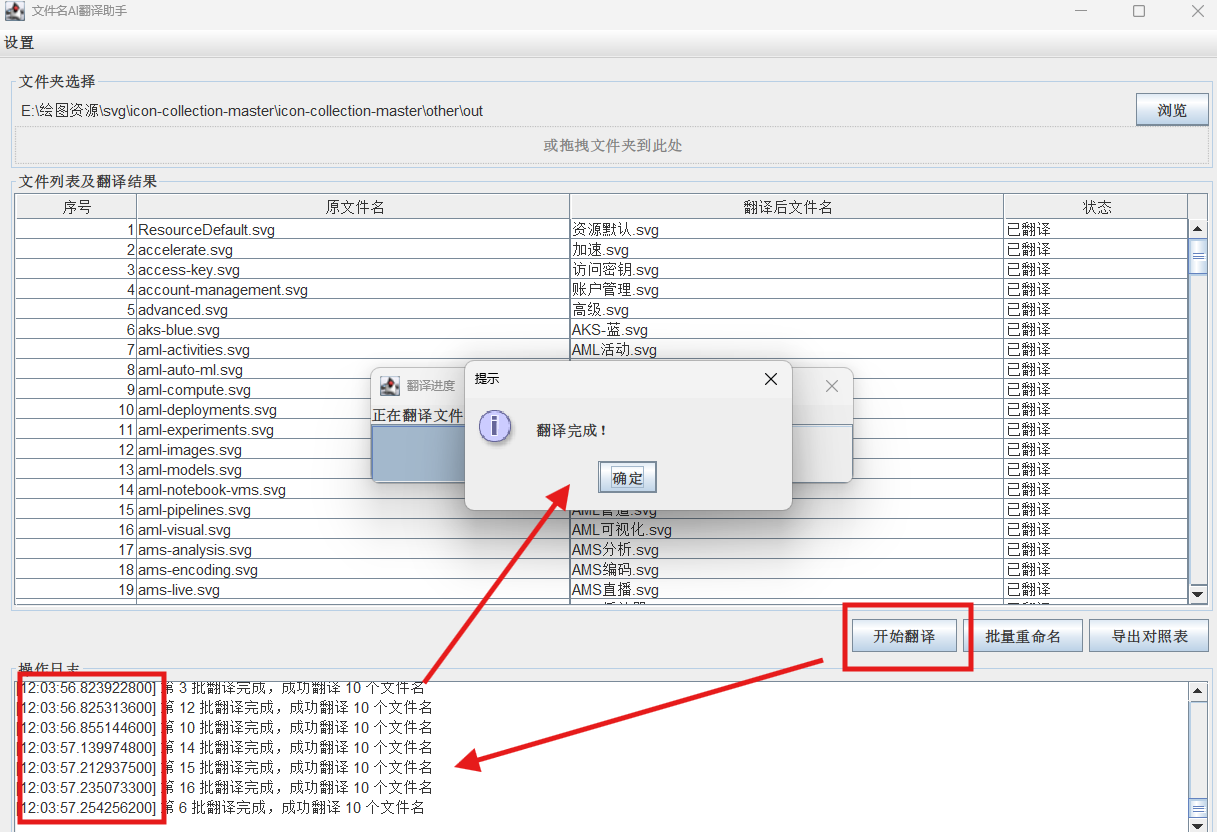
批量翻译功能,通过线程池优化处理效率
-
支持翻译结果导出 CSV 对照表和批量重命名
-
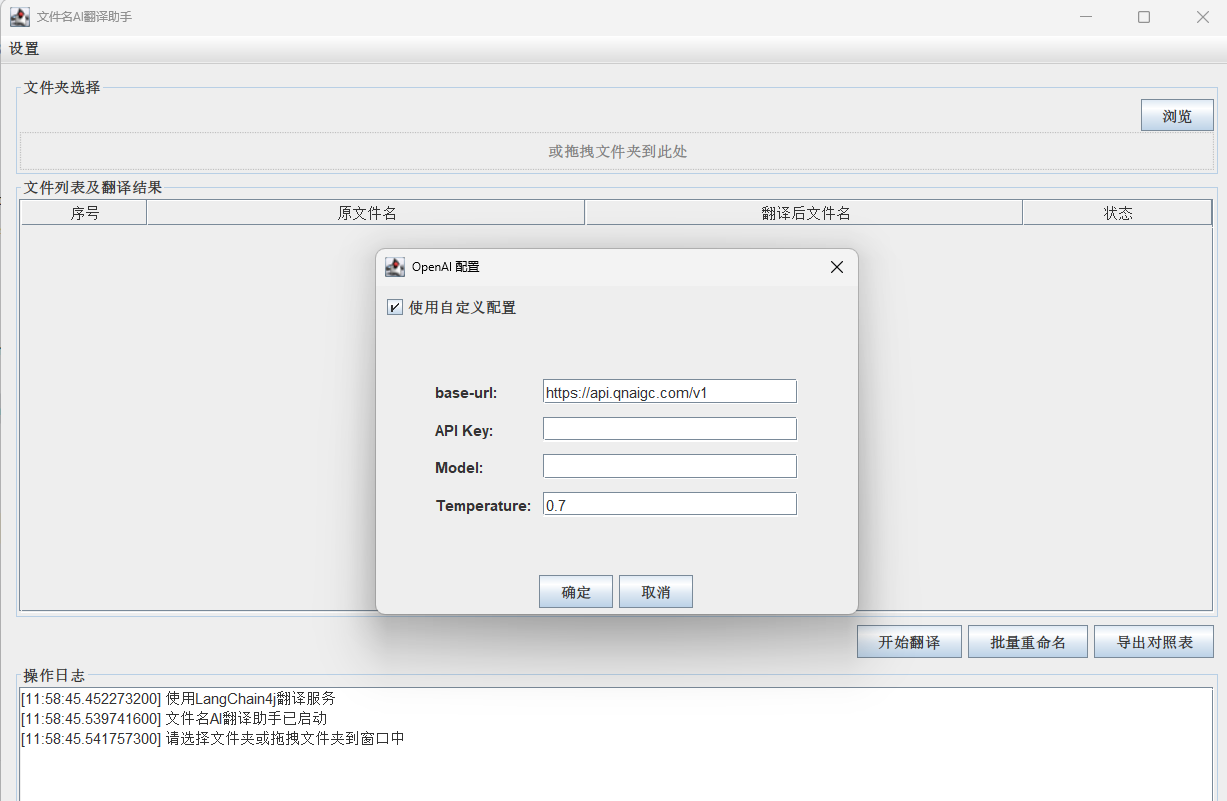
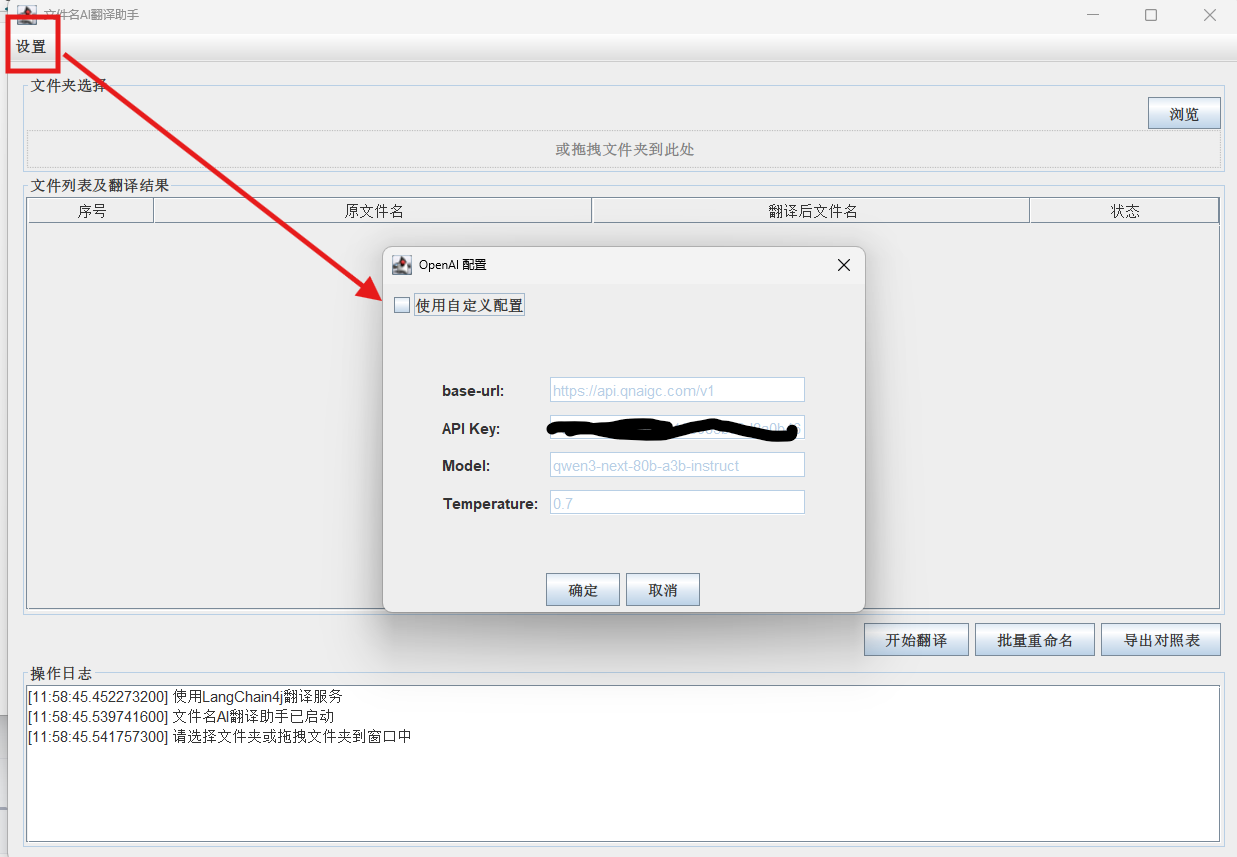
可自定义 API 配置(密钥、模型、url参数等)
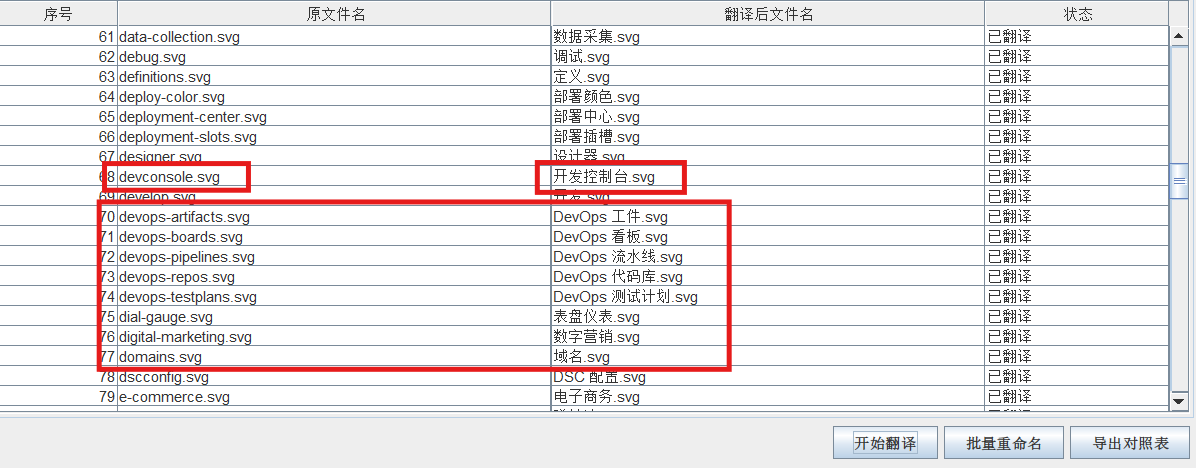
技术架构设计
本项目采用 MVC 设计模式,将界面展示、业务逻辑和数据模型分离,提高代码可维护性和扩展性。整体架构如下:
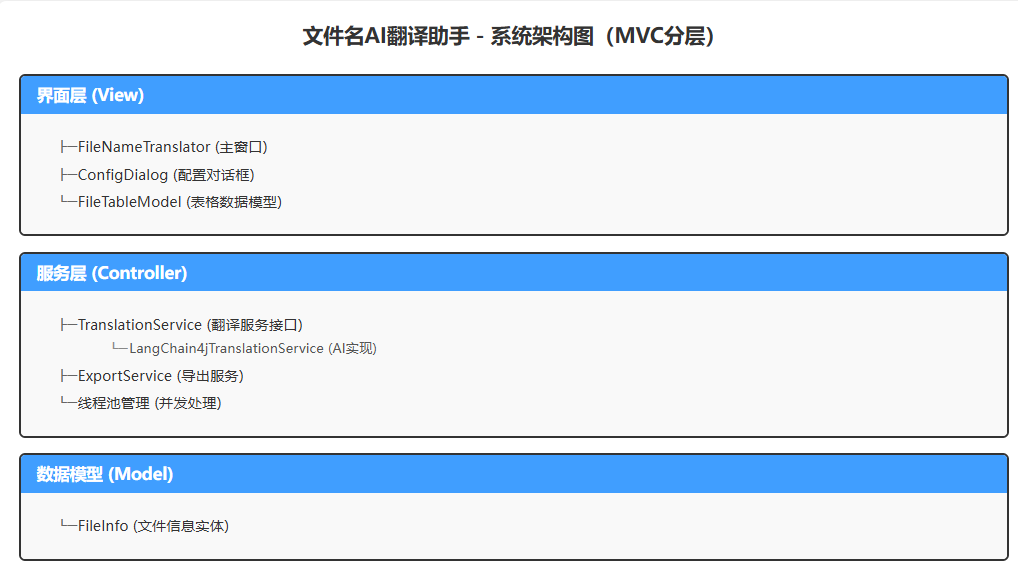
核心技术栈:
-
Java Swing:构建桌面应用界面
-
LangChain4j:AI 模型调用框架,简化大模型集成
-
线程池:优化批量翻译的并发处理能力
-
CSV 处理:实现翻译结果的导出功能
核心模块实现详解
1. 翻译服务接口设计
首先定义翻译服务接口,抽象核心功能,便于后续扩展不同的翻译实现:
public interface TranslationService {
    /**
     * 翻译单个文件名
     * @param fileName 要翻译的文件名(不包含扩展名)
     * @return 翻译后的文件名
     * @throws Exception 翻译过程中发生的异常
     */
    String translateFileName(String fileName) throws Exception;

    /**
     * 批量翻译文件名
     * @param fileNames 要翻译的文件名列表
     * @param callback 进度回调接口
     * @return 翻译结果映射,key为原文件名,value为翻译后文件名
     * @throws Exception 翻译过程中发生的异常
     */
    Map<String, String> batchTranslateFileNames(List<String> fileNames, ProgressCallback callback) throws Exception;

    /**
     * 检查服务是否已正确配置
     * @return 配置正确返回true,否则返回false
     */
    boolean isConfigured();

    /**
     * 更新配置信息
     * @param config 包含新配置信息的Properties对象
     * @throws Exception 配置更新异常
     */
    void updateConfig(Properties config) throws Exception;

    // 进度回调接口
    interface ProgressCallback {
        void onProgress(int current, int total, String message);
        void onBatchComplete(int batchIndex, Map<String, String> results);
        void onError(int batchIndex, String error);
    }
}
2. LangChain4j 翻译服务实现
基于 LangChain4j 框架实现翻译服务,支持主流 AI 模型调用:
核心设计:
-
支持模型兼容性检查,确保使用推荐的 AI 模型
-
批量翻译采用分批处理策略,避免单次请求数据量过大
-
使用线程池并行处理多个批次,提升翻译效率
-
完善的异常处理,针对 API 错误(如密钥无效、模型不支持)提供明确提示
public class LangChain4jTranslationService implements TranslationService {
    private String apiKey;
    private String baseUrl;
    private String model;
    private double temperature;
    private int timeout;
    private ChatModel chatModel;
    private boolean configured = false;

    // 七牛云支持的推荐模型列表
    public static final List<String> QINIU_RECOMMENDED_MODELS = Arrays.asList(
        "gpt-4o-mini", "gpt-4o", "gpt-3.5-turbo",
        "deepseek-r1", "deepseek-v3", "kimi-k2",
        "glm-4.5-air", "gpt-oss-20b"
    );

    public LangChain4jTranslationService() {
        loadConfig();
        initializeChatModel();
    }

    private void loadConfig() {
        // 从配置文件加载API密钥、模型等信息
        Properties properties = new Properties();
        try (InputStream input = getClass().getClassLoader().getResourceAsStream("config.properties")) {
            if (input != null) {
                properties.load(input);
                apiKey = properties.getProperty("openai.api-key");
                baseUrl = properties.getProperty("openai.base-url");
                model = properties.getProperty("openai.model");
                // 加载温度参数和超时设置...

                checkModelCompatibility(); // 检查模型兼容性
                configured = true;
            }
        } catch (Exception e) {
            System.err.println("加载配置文件失败: " + e.getMessage());
        }
    }

    @Override
    public Map<String, String> batchTranslateFileNames(List<String> fileNames, ProgressCallback callback) throws Exception {
        if (!isConfigured()) {
            throw new IllegalStateException("API配置不正确,请检查配置文件");
        }

        // 分批处理,每批10个文件,避免单次请求过大
        int batchSize = 10;
        int totalBatches = (int) Math.ceil((double) fileNames.size() / batchSize);

        // 使用线程池并行处理批次
        int threadPoolSize = Runtime.getRuntime().availableProcessors() * 2;
        ExecutorService executorService = Executors.newFixedThreadPool(threadPoolSize);
        CountDownLatch latch = new CountDownLatch(totalBatches);

        Map<String, String> allResults = new ConcurrentHashMap<>();

        for (int batchIndex = 0; batchIndex < totalBatches; batchIndex++) {
            final int currentBatch = batchIndex;
            final List<String> batchFiles = fileNames.subList(
                batchIndex * batchSize,
                Math.min((batchIndex + 1) * batchSize, fileNames.size())
            );

            executorService.submit(() -> {
                try {
                    // 发送批量翻译请求
                    String prompt = createBatchTranslationPrompt(batchFiles);
                    String response = chatModel.chat(prompt);

                    // 解析响应并更新结果
                    Map<String, String> batchResults = parseBatchResponse(batchFiles, response);
                    allResults.putAll(batchResults);

                    // 回调通知批次完成
                    if (callback != null) {
                        callback.onBatchComplete(currentBatch, batchResults);
                    }
                } catch (Exception e) {
                    if (callback != null) {
                        callback.onError(currentBatch, e.getMessage());
                    }
                } finally {
                    latch.countDown();
                }
            });
        }

        latch.await(); // 等待所有批次完成
        executorService.shutdown();
        return allResults;
    }

    // 其他实现方法...
}
3. 界面设计与交互实现
主界面采用 Swing 构建,包含文件夹选择区、文件列表区和操作区三大部分:
public class FileNameTranslator extends JFrame {
    private final JTextField folderPathField;
    private final JTextArea logArea;
    private final JTable fileTable;
    private final FileTableModel tableModel;
    private final TranslationService translationService;
    private File selectedFolder;

    public FileNameTranslator() {
        // 初始化组件
        setTitle("文件名AI翻译助手");
        setSize(1000, 700);
        setDefaultCloseOperation(EXIT_ON_CLOSE);
        setLocationRelativeTo(null);

        // 创建翻译服务实例
        translationService = new LangChain4jTranslationService();

        // 构建界面布局
        JPanel mainPanel = new JPanel(new BorderLayout());

        // 顶部文件夹选择区
        JPanel topPanel = new JPanel(new BorderLayout());
        topPanel.setBorder(BorderFactory.createTitledBorder("文件夹选择"));

        folderPathField = new JTextField();
        JButton browseButton = new JButton("浏览");
        browseButton.addActionListener(e -> selectFolder());

        // 添加拖放功能
        setDropTarget(new DropTarget() {
            @Override
            public synchronized void drop(DropTargetDropEvent dtde) {
                try {
                    dtde.acceptDrop(DnDConstants.ACTION_COPY);
                    List<File> droppedFiles = (List<File>) dtde.getTransferable()
                            .getTransferData(DataFlavor.javaFileListFlavor);

                    if (!droppedFiles.isEmpty() && droppedFiles.get(0).isDirectory()) {
                        handleFolderSelection(droppedFiles.get(0));
                    }
                } catch (Exception ex) {
                    ex.printStackTrace();
                }
            }
        });

        // 中间文件列表区
        JPanel middlePanel = new JPanel(new BorderLayout());
        tableModel = new FileTableModel();
        fileTable = new JTable(tableModel);
        JScrollPane tableScrollPane = new JScrollPane(fileTable);
        middlePanel.add(tableScrollPane, BorderLayout.CENTER);

        // 底部操作区
        JPanel bottomPanel = new JPanel(new BorderLayout());
        JPanel buttonPanel = new JPanel();

        JButton translateButton = new JButton("开始翻译");
        translateButton.addActionListener(e -> startTranslation());

        JButton renameButton = new JButton("批量重命名");
        renameButton.addActionListener(e -> batchRename());

        JButton exportButton = new JButton("导出对照表");
        exportButton.addActionListener(e -> exportTranslationTable());

        // 组装界面...
        add(mainPanel);
        setVisible(true);
    }

    // 文件夹选择处理
    private void handleFolderSelection(File folder) {
        this.selectedFolder = folder;
        folderPathField.setText(folder.getAbsolutePath());
        log("已选择文件夹: " + folder.getAbsolutePath());
        loadFiles(folder);
    }

    // 加载文件并过滤含中文的文件
    private void loadFiles(File folder) {
        log("正在加载文件列表...");
        tableModel.clear();

        File[] files = folder.listFiles();
        if (files != null) {
            int loadedCount = 0;
            for (File file : files) {
                if (file.isFile() && !containsChinese(file.getName())) {
                    tableModel.addFile(new FileInfo(file));
                    loadedCount++;
                } else {
                    log("跳过含有中文的文件: " + file.getName());
                }
            }
            log("已加载 " + loadedCount + " 个文件");
        }
    }

    // 检查是否包含中文字符
    private boolean containsChinese(String str) {
        String regex = "[\\u4e00-\\u9fa5]";
        return str.matches(".*" + regex + ".*");
    }

    // 其他功能实现...
}
界面交互:
-
支持文件夹拖放操作,简化用户输入
-
实时日志反馈,让用户了解当前操作状态
-
表格动态展示文件翻译状态(待翻译 / 已翻译 / 失败)
-
中文文件自动过滤,减少不必要的翻译操作
public class FileNameTranslator extends JFrame {
    private final JTextField folderPathField;
    private final JTextArea logArea;
    private final JTable fileTable;
    private final FileTableModel tableModel;
    private final TranslationService translationService;
    private File selectedFolder;

    public FileNameTranslator() {
        // 初始化组件
        setTitle("文件名AI翻译助手");
        setSize(1000, 700);
        setDefaultCloseOperation(EXIT_ON_CLOSE);
        setLocationRelativeTo(null);

        // 创建翻译服务实例
        translationService = new LangChain4jTranslationService();

        // 构建界面布局
        JPanel mainPanel = new JPanel(new BorderLayout());

        // 顶部文件夹选择区
        JPanel topPanel = new JPanel(new BorderLayout());
        topPanel.setBorder(BorderFactory.createTitledBorder("文件夹选择"));

        folderPathField = new JTextField();
        JButton browseButton = new JButton("浏览");
        browseButton.addActionListener(e -> selectFolder());

        // 添加拖放功能
        setDropTarget(new DropTarget() {
            @Override
            public synchronized void drop(DropTargetDropEvent dtde) {
                try {
                    dtde.acceptDrop(DnDConstants.ACTION_COPY);
                    List<File> droppedFiles = (List<File>) dtde.getTransferable()
                            .getTransferData(DataFlavor.javaFileListFlavor);

                    if (!droppedFiles.isEmpty() && droppedFiles.get(0).isDirectory()) {
                        handleFolderSelection(droppedFiles.get(0));
                    }
                } catch (Exception ex) {
                    ex.printStackTrace();
                }
            }
        });

        // 中间文件列表区
        JPanel middlePanel = new JPanel(new BorderLayout());
        tableModel = new FileTableModel();
        fileTable = new JTable(tableModel);
        JScrollPane tableScrollPane = new JScrollPane(fileTable);
        middlePanel.add(tableScrollPane, BorderLayout.CENTER);

        // 底部操作区
        JPanel bottomPanel = new JPanel(new BorderLayout());
        JPanel buttonPanel = new JPanel();

        JButton translateButton = new JButton("开始翻译");
        translateButton.addActionListener(e -> startTranslation());

        JButton renameButton = new JButton("批量重命名");
        renameButton.addActionListener(e -> batchRename());

        JButton exportButton = new JButton("导出对照表");
        exportButton.addActionListener(e -> exportTranslationTable());

        // 组装界面...
        add(mainPanel);
        setVisible(true);
    }

    // 文件夹选择处理
    private void handleFolderSelection(File folder) {
        this.selectedFolder = folder;
        folderPathField.setText(folder.getAbsolutePath());
        log("已选择文件夹: " + folder.getAbsolutePath());
        loadFiles(folder);
    }

    // 加载文件并过滤含中文的文件
    private void loadFiles(File folder) {
        log("正在加载文件列表...");
        tableModel.clear();

        File[] files = folder.listFiles();
        if (files != null) {
            int loadedCount = 0;
            for (File file : files) {
                if (file.isFile() && !containsChinese(file.getName())) {
                    tableModel.addFile(new FileInfo(file));
                    loadedCount++;
                } else {
                    log("跳过含有中文的文件: " + file.getName());
                }
            }
            log("已加载 " + loadedCount + " 个文件");
        }
    }

    // 检查是否包含中文字符
    private boolean containsChinese(String str) {
        String regex = "[\\u4e00-\\u9fa5]";
        return str.matches(".*" + regex + ".*");
    }

    // 其他功能实现...
}
4. 配置管理模块
实现可自定义的 AI 配置功能,允许用户根据需求选择不同模型和参数:
public class ConfigDialog extends JDialog {
    private JTextField baseUrlField;
    private JTextField apiKeyField;
    private JTextField modelField;
    private JTextField temperatureField;
    private final JCheckBox useCustomConfig;
    private boolean confirmed = false;

    public ConfigDialog(Frame owner, Properties defaultConfig) {
        super(owner, "AI 配置", true);
        setSize(400, 300);
        setLocationRelativeTo(owner);

        // 创建配置表单
        JPanel mainPanel = new JPanel(new GridBagLayout());
        GridBagConstraints gbc = new GridBagConstraints();
        gbc.insets = new Insets(5, 5, 5, 5);
        gbc.fill = GridBagConstraints.HORIZONTAL;

        // 使用自定义配置的复选框
        useCustomConfig = new JCheckBox("使用自定义配置");
        useCustomConfig.addActionListener(e -> {
            boolean enabled = useCustomConfig.isSelected();
            baseUrlField.setEnabled(enabled);
            apiKeyField.setEnabled(enabled);
            modelField.setEnabled(enabled);
            temperatureField.setEnabled(enabled);
        });

        // 添加配置项:base-url、API Key、Model、Temperature
        // ...

        // 设置默认值
        if (defaultConfig != null) {
            baseUrlField.setText(defaultConfig.getProperty("openai.base-url",
                "https://api.qnaigc.com/v1"));
            apiKeyField.setText(defaultConfig.getProperty("openai.api-key", ""));
            modelField.setText(defaultConfig.getProperty("openai.model", "glm-4.5-air"));
            temperatureField.setText(defaultConfig.getProperty("openai.temperature", "0.7"));
        }

        // 确定和取消按钮
        // ...
    }

    public Properties getConfig() {
        Properties config = new Properties();
        if (isUseCustomConfig()) {
            config.setProperty("openai.api-key", apiKeyField.getText());
            config.setProperty("openai.model", modelField.getText());
            config.setProperty("openai.temperature", temperatureField.getText());
            config.setProperty("openai.base-url", baseUrlField.getText());
        }
        return config;
    }

    // 其他方法...
}
关键技术亮点
-
高效批量处理:通过线程池和分批策略,将大量文件分成多个批次并行处理,大幅提升翻译效率
-
模型兼容性设计:内置推荐模型列表,自动检查模型兼容性,降低用户配置错误率
-
健壮的异常处理:针对 API 调用可能出现的各种错误(密钥无效、模型不支持等)提供明确提示
-
用户体验优化:
支持拖放操作,简化文件夹选择
实时进度反馈,让用户了解处理状态
自动过滤含中文文件,减少无效操作 -
可扩展性设计:通过接口抽象翻译服务,便于未来集成其他翻译 API 或模型
使用示例与效果展示
基本使用流程
-
选择或拖拽文件夹到应用程序
-
系统自动加载并过滤文件,显示在表格中
-
点击 “开始翻译” 按钮,等待翻译完成
-
可选择导出 CSV 对照表或直接批量重命名
批量翻译 1000 个文件名耗时约 3 秒(视网络情况和模型响应速度而定)。
总结与扩展方向
本文介绍的文件名 AI 翻译助手通过 LangChain4j 框架快速集成 AI 能力,实现了高效的文件名批量翻译功能。该工具特别适合需要处理大量英文文件的场景,能显著提升工作效率。
未来可以从以下几个方向进行扩展:
-
支持更多语言互译(如日文、韩文等)
-
增加文件名预览功能,支持手动修改翻译结果
-
集成本地模型,实现离线翻译
-
添加文件名格式标准化功能(如驼峰式转下划线)
-
支持正则表达式过滤特定文件
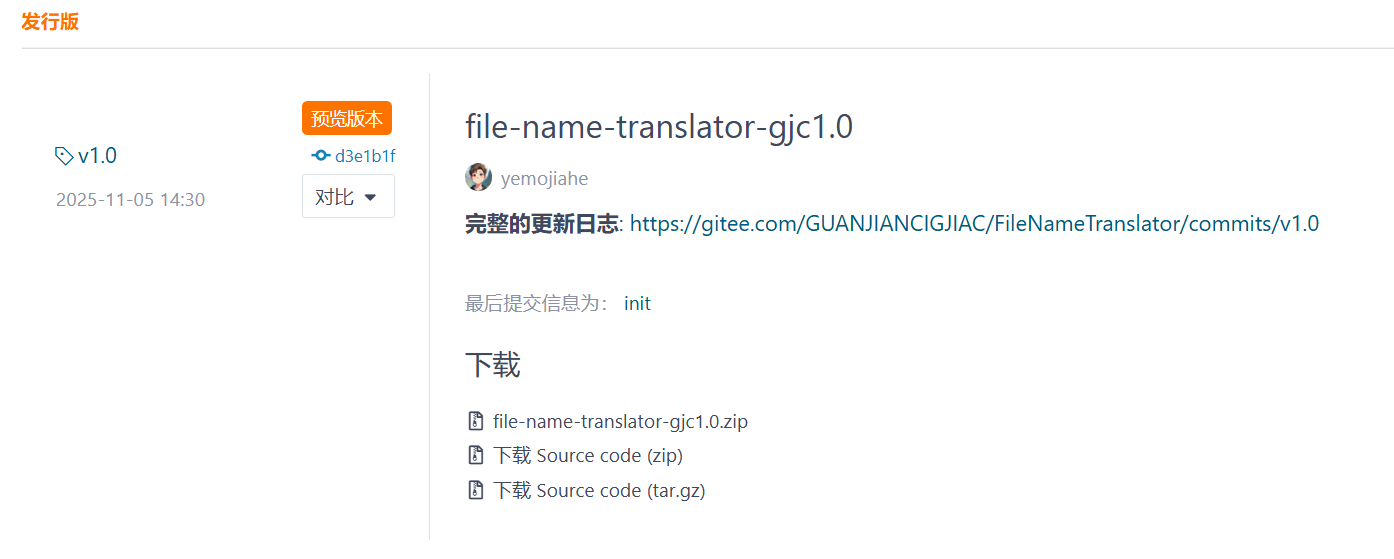
项目完整代码已上传至 Gitee点击此处(链接),下图是打包好的可执行文件
欢迎大家 Star 和 Fork,共同完善这个工具。

助力广东及东莞地区开发者,代码托管、在线学习与竞赛、技术交流与分享、资源共享、职业发展,成为松山湖开发者首选的工作与学习平台
更多推荐



 11
11 0
0- 0


 已为社区贡献1条内容

所有评论(0)