(文后附完整代码)html+css+javascript 抓娃娃游戏项目分析
前言:哈喽,大家好,今天给大家分享一篇文章!并提供具体代码帮助大家深入理解,彻底掌握!创作不易,如果能帮助到大家或者给大家一些灵感和启发,欢迎 点赞 + 收藏 + 关注 哦 💕
(文后附完整代码)html+css+javascript 抓娃娃游戏项目分析
📚 效果展示
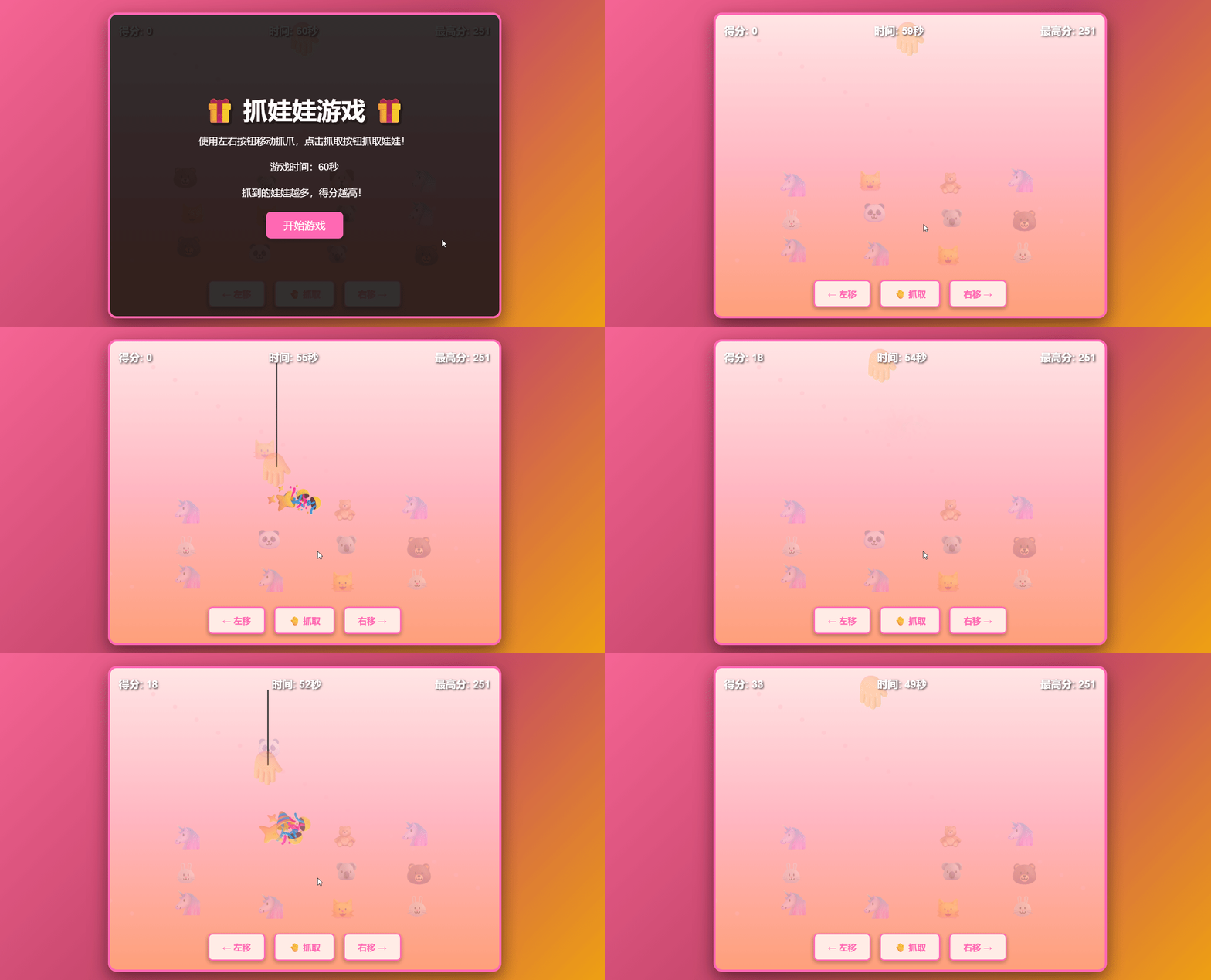
📚 本文简介
本文介绍了一个基于HTML5 Canvas的抓娃娃游戏项目,采用HTML+CSS+JavaScript技术栈实现。游戏包含娃娃系统、抓爪控制、得分计时等核心功能,通过Web Audio API动态生成音效。文章详细分析了项目架构、技术实现、视觉设计和交互逻辑,并提供了完整代码。游戏采用模块化设计,具有流畅的动画效果和丰富的视觉反馈,可作为HTML5游戏开发的参考案例。
目录
📚 一、项目架构概述
抓娃娃游戏是一个基于HTML5 Canvas的互动游戏项目,采用了模块化的代码结构,将游戏逻辑、视觉表现和音频效果分离。项目主要由两个核心文件组成:index.html负责游戏的界面结构、样式和主逻辑,backgroundMusic.js负责背景音乐的生成与控制。
📘 1.1 技术栈
- HTML5:提供游戏的基础结构和Canvas绘图环境
- CSS3:实现游戏的视觉样式和动画效果
- JavaScript (ES6+):处理游戏逻辑、用户交互和音频生成
- Web Audio API:用于动态生成游戏音效和背景音乐
- Canvas API:实现娃娃和抓爪的绘制与动画
📘 1.2 项目结构
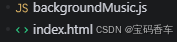
抓娃娃/
├── index.html          # 主游戏文件,包含HTML、CSS和JavaScript主逻辑
├── backgroundMusic.js  # 背景音乐模块,负责音频生成和控制
📚 二、HTML结构分析:语义化与模块化的界面搭建
📘 2.1 整体布局设计
游戏采用了相对简单但功能完整的HTML结构,主要分为游戏容器和各种UI元素。整体布局采用了Flexbox进行居中对齐,确保游戏在不同屏幕尺寸下都能保持良好的视觉效果。
📘 2.2 关键元素解析
📖 2.2.1 Canvas元素的单画布设计
项目使用了单个Canvas元素作为游戏的主要绘图区域,尺寸与游戏容器保持一致,用于绘制娃娃、抓爪和背景装饰。
<canvas id="gameCanvas"></canvas>
📖 2.2.2 多层UI结构设计
游戏界面采用了多层叠加的设计,通过CSS的z-index属性控制各层的显示顺序:
- 底层:Canvas绘图区域(z-index: 1)
- 中层:抓爪元素(z-index: 40)
- 上层:游戏UI(得分、时间、最高分)、控制按钮、开始/结束界面(z-index: 10-100)
- 特效层:抓取特效、得分弹出效果(z-index: 50-60)
📖 2.2.3 状态界面设计
游戏包含两个主要的状态界面:
- 开始界面:显示游戏标题、规则和开始按钮
- 结束界面:显示最终得分和重新开始按钮
这两个界面通过CSS的display属性控制显示与隐藏,实现了游戏状态的平滑切换。
📚 三、CSS样式分析:视觉效果与交互反馈
📘 3.1 色彩与视觉风格
游戏采用了明亮、欢快的色彩方案,以粉色和红色为主色调,营造出温馨、有趣的游戏氛围:
- 背景:渐变色从粉色到橙色,营造温暖感
- 游戏容器:粉色系渐变,搭配白色装饰点
- 控制按钮:白色背景配粉色边框,悬停时反色
📘 3.2 动画与过渡效果
项目使用了丰富的CSS动画和过渡效果,提升了游戏的视觉吸引力和交互反馈:
📖 3.2.1 特效动画
- 漂浮效果:用于抓取成功/失败时的表情符号动画
- 得分弹出:用于显示获得分数的动画
- 抓爪缩放:抓取时的缩放效果,增强交互感
📖 3.2.2 过渡效果
- 按钮悬停效果:背景色和缩放变化
- 抓爪移动的平滑过渡
📘 3.3 响应式设计
游戏容器采用了固定尺寸设计,但通过Flexbox布局确保在不同屏幕尺寸下都能居中显示。控制按钮区域使用了transform: translateX(-50%)实现水平居中,确保在各种分辨率下都能保持良好的布局。
📚 四、JavaScript逻辑分析:游戏核心机制
📘 4.1 游戏状态管理
项目采用了集中式的游戏状态管理,通过一个gameState对象跟踪游戏的运行状态:
const gameState = {
    gameRunning: false,
    gamePaused: false,
    gameOver: false
};
这种设计使得游戏状态的切换和查询变得简单高效,便于背景音乐等外部模块获取当前状态。
📘 4.2 Canvas绘图与动画
📖 4.2.1 娃娃系统
- 娃娃类型:定义了8种不同类型的娃娃,每种娃娃有不同的表情符号、分数和尺寸
- 娃娃生成:游戏开始时,在Canvas上生成3行4列的娃娃矩阵,位置带有随机偏移,增加自然感
- 娃娃绘制:使用Canvas的
fillText方法绘制娃娃表情符号
📖 4.2.2 抓爪系统
- 抓爪移动:通过键盘或按钮控制左右移动,带有碰撞检测防止移出边界
- 抓取机制:抓爪可以下降、抓取娃娃并上升
- 碰撞检测:使用距离检测算法判断抓爪是否接触到娃娃
📖 4.2.3 游戏循环
采用了requestAnimationFrame实现流畅的游戏动画,主要包含以下步骤:
- 清除画布
- 绘制背景装饰
- 绘制娃娃
- 更新抓爪状态
- 绘制抓爪
📘 4.3 音频系统
📖 4.3.1 Web Audio API应用
项目使用Web Audio API动态生成所有音频,包括:
- 音效:抓取、成功、失败、移动四种音效
- 背景音乐:由
backgroundMusic.js模块生成的循环电子音乐
📖 4.3.2 音频控制
- 使用增益节点(GainNode)控制不同音频的音量
- 实现了音乐与游戏状态的同步,游戏结束时自动停止音乐
📘 4.4 用户交互
📖 4.4.1 输入方式
游戏支持两种输入方式:
- 按钮控制:左右移动按钮和抓取按钮
- 键盘控制:方向键或A/D键控制移动,空格键或回车键控制抓取
📖 4.4.2 交互反馈
- 按钮悬停效果
- 键盘/按钮按下时的音效反馈
- 抓取成功/失败时的视觉和音效反馈
📘 4.5 游戏机制
📖 4.5.1 得分系统
- 不同类型的娃娃对应不同的分数(10-25分)
- 得分实时更新并显示
- 最高分保存在localStorage中
📖 4.5.2 时间系统
- 游戏时长为60秒
- 实时显示剩余时间
- 时间结束时自动结束游戏
📖 4.5.3 娃娃刷新机制
当所有娃娃被抓取后,会自动生成新的娃娃矩阵,确保游戏可以持续进行直到时间结束
📚 五、功能模块分析:模块化设计与职责分离
📘 5.1 主游戏模块(index.html)
📖 5.1.1 游戏初始化
- 初始化Canvas和音频上下文
- 设置游戏状态和初始变量
- 绑定事件监听器
📖 5.1.2 游戏循环
- 实现娃娃和抓爪的绘制与动画
- 处理用户输入和游戏逻辑
- 检测游戏结束条件
📖 5.1.3 特效系统
- 创建抓取成功/失败的特效
- 生成得分弹出效果
📘 5.2 背景音乐模块(backgroundMusic.js)
📖 5.2.1 音频生成
- 使用振荡器(Oscillator)生成不同频率的声音
- 支持多种波形(方波、锯齿波、正弦波、三角波)
- 实现了旋律的循环播放
📖 5.2.2 状态同步
- 接收游戏状态更新
- 根据游戏状态控制音乐播放
- 实现音乐的自动启停
📚 六、性能与优化分析
📘 6.1 渲染性能
- 使用
requestAnimationFrame确保流畅的动画效果 - 只在必要时更新和重绘游戏元素
- 清除画布时使用
clearRect方法,高效清除指定区域
📘 6.2 内存管理
- 及时清除不再需要的DOM元素(如特效)
- 合理管理音频上下文和振荡器资源
- 游戏结束时重置所有状态和变量
📘 6.3 代码优化
- 采用模块化设计,便于维护和扩展
- 使用了ES6+语法,代码简洁高效
- 事件监听器绑定合理,避免内存泄漏
📚 七、总结与建议
📘 7.1 项目优点
- 模块化设计:代码结构清晰,职责分离明确
- 丰富的视觉效果:使用CSS动画和Canvas绘图,视觉表现出色
- 流畅的交互体验:响应迅速的用户输入和反馈机制
- 动态音频生成:使用Web Audio API生成多样化的音效和音乐
- 良好的游戏机制:简单易懂但富有挑战性的游戏规则
📘 7.2 改进建议
- 添加响应式设计:适配不同屏幕尺寸,优化移动端体验
- 增加娃娃种类和动画:可以为娃娃添加简单的动画效果,增加趣味性
- 添加难度递增机制:随着游戏进行,娃娃移动速度加快或抓爪精度要求提高
- 添加更多游戏模式:如限时挑战、无限模式等
- 优化音频系统:添加音量控制和静音选项,支持自定义音效
- 添加粒子效果:在抓取成功时添加更丰富的粒子效果,增强视觉冲击力
📘 7.3 技术亮点
- 动态音频生成:不依赖外部音频文件,使用Web Audio API实时生成音效和音乐
- 简洁高效的碰撞检测:使用距离算法实现精准的娃娃抓取检测
- 模块化的状态管理:便于扩展和维护
- 丰富的视觉反馈:通过CSS动画和Canvas绘图实现多样化的视觉效果
📚 八、未来扩展方向
- 添加社交功能:支持分享得分到社交媒体
- 实现多人模式:支持在线多人同时游戏,增加竞技性
- 添加关卡系统:不同关卡有不同的娃娃布局和难度
- 支持自定义娃娃:允许玩家上传或选择自定义娃娃样式
- 添加物理引擎:实现更真实的娃娃碰撞和抓爪物理效果
通过以上分析,可以看出这个抓娃娃游戏项目虽然简单,但涵盖了HTML5游戏开发的核心技术,包括Canvas绘图、动画实现、用户交互、音频处理等。项目结构清晰,代码组织合理,具有良好的扩展性和可维护性,是一个优秀的HTML5小游戏示例。
📚 完整代码(可直接使用)
📘 项目目录
📘 项目代码
📖 html代码
<!DOCTYPE html>
<html lang="zh-CN">
<head>
<meta charset="UTF-8">
<meta name="viewport" content="width=device-width, initial-scale=1.0">
<title>抓娃娃游戏</title>
<style>
* {
margin: 0;
padding: 0;
box-sizing: border-box;
}
body {
font-family: 'Arial', sans-serif;
display: flex;
justify-content: center;
align-items: center;
min-height: 100vh;
background: linear-gradient(135deg, #FF6B9D 0%, #C44569 50%, #F8B500 100%);
overflow: hidden;
}
#gameContainer {
position: relative;
width: 900px;
height: 700px;
background: linear-gradient(to bottom, #FFE5E5 0%, #FFB6C1 50%, #FFA07A 100%);
border: 5px solid #FF69B4;
border-radius: 20px;
box-shadow: 0 15px 40px rgba(0, 0, 0, 0.5);
overflow: hidden;
}
#gameCanvas {
display: block;
width: 100%;
height: 100%;
}
#ui {
position: absolute;
top: 20px;
left: 20px;
right: 20px;
display: flex;
justify-content: space-between;
color: #fff;
font-size: 24px;
font-weight: bold;
text-shadow: 2px 2px 4px rgba(0, 0, 0, 0.8);
z-index: 10;
pointer-events: none;
}
#startScreen {
position: absolute;
top: 0;
left: 0;
width: 100%;
height: 100%;
background: rgba(0, 0, 0, 0.8);
display: flex;
flex-direction: column;
justify-content: center;
align-items: center;
color: #fff;
z-index: 100;
cursor: default;
}
#startScreen h1 {
font-size: 56px;
margin-bottom: 20px;
text-shadow: 3px 3px 6px rgba(0, 0, 0, 0.8);
}
#startScreen p {
font-size: 22px;
margin-bottom: 30px;
text-align: center;
}
#startButton {
padding: 15px 40px;
font-size: 24px;
background: #FF69B4;
color: #fff;
border: none;
border-radius: 10px;
cursor: pointer;
transition: all 0.3s;
box-shadow: 0 4px 15px rgba(0, 0, 0, 0.3);
}
#startButton:hover {
background: #FF1493;
transform: scale(1.05);
}
#gameOverScreen {
position: absolute;
top: 0;
left: 0;
width: 100%;
height: 100%;
background: rgba(0, 0, 0, 0.8);
display: none;
flex-direction: column;
justify-content: center;
align-items: center;
color: #fff;
z-index: 100;
cursor: default;
}
#gameOverScreen h2 {
font-size: 48px;
margin-bottom: 20px;
color: #FF69B4;
}
#finalScore {
font-size: 32px;
margin-bottom: 30px;
}
#restartButton {
padding: 15px 40px;
font-size: 24px;
background: #FF69B4;
color: #fff;
border: none;
border-radius: 10px;
cursor: pointer;
transition: all 0.3s;
}
#restartButton:hover {
background: #FF1493;
transform: scale(1.05);
}
.effect {
position: absolute;
font-size: 60px;
pointer-events: none;
z-index: 50;
animation: floatUp 1.2s ease-out forwards;
user-select: none;
}
@keyframes floatUp {
0% {
opacity: 1;
transform: translateY(0) scale(1) rotate(0deg);
}
100% {
opacity: 0;
transform: translateY(-200px) scale(1.5) rotate(360deg);
}
}
.score-popup {
position: absolute;
font-size: 30px;
font-weight: bold;
color: #FFD700;
text-shadow: 2px 2px 4px rgba(0, 0, 0, 0.8);
pointer-events: none;
z-index: 60;
animation: scoreFloat 1s ease-out forwards;
}
@keyframes scoreFloat {
0% {
opacity: 1;
transform: translateY(0) scale(1);
}
100% {
opacity: 0;
transform: translateY(-100px) scale(1.3);
}
}
#claw {
position: absolute;
font-size: 80px;
pointer-events: none;
z-index: 40;
transform-origin: center center;
transition: transform 0.1s ease-out;
user-select: none;
}
#claw.grabbing {
transform: scale(1.2);
}
#controlPanel {
position: absolute;
bottom: 20px;
left: 50%;
transform: translateX(-50%);
display: flex;
gap: 20px;
z-index: 20;
}
.controlButton {
padding: 15px 30px;
font-size: 20px;
background: rgba(255, 255, 255, 0.8);
color: #FF69B4;
border: 3px solid #FF69B4;
border-radius: 10px;
cursor: pointer;
font-weight: bold;
transition: all 0.2s;
box-shadow: 0 4px 10px rgba(0, 0, 0, 0.3);
}
.controlButton:hover {
background: #FF69B4;
color: #fff;
transform: scale(1.05);
}
.controlButton:active {
transform: scale(0.95);
}
</style>
</head>
<body>
<div id="gameContainer">
<canvas id="gameCanvas"></canvas>
<div id="ui">
<div>得分: <span id="score">0</span></div>
<div>时间: <span id="time">60</span>秒</div>
<div>最高分: <span id="highScore">0</span></div>
</div>
<div id="claw">🤚</div>
<div id="controlPanel">
<button class="controlButton" id="leftBtn">← 左移</button>
<button class="controlButton" id="grabBtn">🤚 抓取</button>
<button class="controlButton" id="rightBtn">右移 →</button>
</div>
<div id="startScreen">
<h1>🎁 抓娃娃游戏 🎁</h1>
<p>使用左右按钮移动抓爪,点击抓取按钮抓取娃娃!</p>
<p>游戏时间:60秒</p>
<p>抓到的娃娃越多,得分越高!</p>
<button id="startButton">开始游戏</button>
</div>
<div id="gameOverScreen">
<h2>游戏结束</h2>
<div id="finalScore">得分: 0</div>
<button id="restartButton">重新开始</button>
</div>
</div>
<script src="backgroundMusic.js"></script>
<script>
// 游戏状态
const gameState = {
gameRunning: false,
gamePaused: false,
gameOver: false
};
// 获取游戏状态(供backgroundMusic.js使用)
function getCurrentGameState() {
return gameState;
}
// 初始化音频上下文
const audioContext = new (window.AudioContext || window.webkitAudioContext)();
const masterGain = audioContext.createGain();
masterGain.connect(audioContext.destination);
masterGain.gain.value = 0.5;
const backgroundMusicGain = audioContext.createGain();
backgroundMusicGain.connect(masterGain);
backgroundMusicGain.gain.value = 0.25;
const soundEffectGain = audioContext.createGain();
soundEffectGain.connect(masterGain);
soundEffectGain.gain.value = 0.5;
// 初始化背景音乐
initBackgroundMusic(audioContext, backgroundMusicGain);
setGameStateGetter(getCurrentGameState);
// 音效生成函数
function playSound(type) {
const currentTime = audioContext.currentTime;
let osc, gain;
switch(type) {
case 'grab':
// 抓取音效 - 机械声
osc = audioContext.createOscillator();
gain = audioContext.createGain();
osc.connect(gain);
gain.connect(soundEffectGain);
osc.type = 'sawtooth';
osc.frequency.setValueAtTime(200, currentTime);
osc.frequency.exponentialRampToValueAtTime(150, currentTime + 0.3);
gain.gain.setValueAtTime(0.3, currentTime);
gain.gain.exponentialRampToValueAtTime(0.01, currentTime + 0.3);
osc.start(currentTime);
osc.stop(currentTime + 0.3);
break;
case 'success':
// 成功音效 - 欢快的上升音
for (let i = 0; i < 3; i++) {
const delay = i * 0.08;
osc = audioContext.createOscillator();
gain = audioContext.createGain();
osc.connect(gain);
gain.connect(soundEffectGain);
osc.type = 'sine';
osc.frequency.value = 400 + i * 200;
gain.gain.setValueAtTime(0.25, currentTime + delay);
gain.gain.exponentialRampToValueAtTime(0.01, currentTime + delay + 0.2);
osc.start(currentTime + delay);
osc.stop(currentTime + delay + 0.2);
}
break;
case 'fail':
// 失败音效 - 低沉的下降音
osc = audioContext.createOscillator();
gain = audioContext.createGain();
osc.connect(gain);
gain.connect(soundEffectGain);
osc.type = 'triangle';
osc.frequency.setValueAtTime(300, currentTime);
osc.frequency.exponentialRampToValueAtTime(150, currentTime + 0.3);
gain.gain.setValueAtTime(0.2, currentTime);
gain.gain.exponentialRampToValueAtTime(0.01, currentTime + 0.3);
osc.start(currentTime);
osc.stop(currentTime + 0.3);
break;
case 'move':
// 移动音效 - 短促的提示音
osc = audioContext.createOscillator();
gain = audioContext.createGain();
osc.connect(gain);
gain.connect(soundEffectGain);
osc.type = 'square';
osc.frequency.value = 400;
gain.gain.setValueAtTime(0.1, currentTime);
gain.gain.exponentialRampToValueAtTime(0.01, currentTime + 0.05);
osc.start(currentTime);
osc.stop(currentTime + 0.05);
break;
}
}
// 创建特效函数
function createEffect(emoji, x, y) {
const effect = document.createElement('div');
effect.className = 'effect';
effect.textContent = emoji;
effect.style.left = x + 'px';
effect.style.top = y + 'px';
document.getElementById('gameContainer').appendChild(effect);
setTimeout(() => {
effect.remove();
}, 1200);
}
// 创建得分弹出效果
function createScorePopup(score, x, y) {
const popup = document.createElement('div');
popup.className = 'score-popup';
popup.textContent = '+' + score;
popup.style.left = x + 'px';
popup.style.top = y + 'px';
document.getElementById('gameContainer').appendChild(popup);
setTimeout(() => {
popup.remove();
}, 1000);
}
// 游戏变量
const canvas = document.getElementById('gameCanvas');
const ctx = canvas.getContext('2d');
const gameContainer = document.getElementById('gameContainer');
const claw = document.getElementById('claw');
canvas.width = gameContainer.offsetWidth;
canvas.height = gameContainer.offsetHeight;
const toys = [];
let score = 0;
let highScore = localStorage.getItem('clawMachineHighScore') || 0;
let timeLeft = 60;
let gameTimer = null;
let clawX = canvas.width / 2;
let clawY = 50;
let clawSpeed = 5;
let isGrabbing = false;
let grabProgress = 0;
let grabbedToy = null;
let clawDirection = 0; // -1: 左, 0: 停止, 1: 右
// 娃娃类型
const toyTypes = [
{ emoji: '🧸', points: 10, color: '#FFB6C1', size: 50 },
{ emoji: '🐻', points: 15, color: '#DDA0DD', size: 55 },
{ emoji: '🐰', points: 12, color: '#FFE4E1', size: 48 },
{ emoji: '🐱', points: 18, color: '#F0E68C', size: 52 },
{ emoji: '🐶', points: 20, color: '#FFA07A', size: 58 },
{ emoji: '🦄', points: 25, color: '#DDA0DD', size: 60 },
{ emoji: '🐼', points: 15, color: '#F5F5DC', size: 50 },
{ emoji: '🐨', points: 12, color: '#E0E0E0', size: 48 }
];
document.getElementById('highScore').textContent = highScore;
// 创建娃娃
function createToys() {
toys.length = 0;
const rows = 3;
const cols = 4;
const spacingX = canvas.width / (cols + 1);
const spacingY = 80;
const startY = canvas.height - 150;
for (let row = 0; row < rows; row++) {
for (let col = 0; col < cols; col++) {
const toyType = toyTypes[Math.floor(Math.random() * toyTypes.length)];
const toy = {
x: spacingX * (col + 1) + (Math.random() - 0.5) * 30,
y: startY - row * spacingY + (Math.random() - 0.5) * 20,
type: toyType,
emoji: toyType.emoji,
points: toyType.points,
size: toyType.size,
grabbed: false,
collected: false
};
toys.push(toy);
}
}
}
// 绘制娃娃
function drawToys() {
toys.forEach(toy => {
if (toy.collected) return;
ctx.save();
ctx.font = `${toy.size}px Arial`;
ctx.textAlign = 'center';
ctx.textBaseline = 'middle';
if (toy.grabbed) {
ctx.globalAlpha = 0.7;
}
ctx.fillText(toy.emoji, toy.x, toy.y);
ctx.restore();
});
}
// 绘制抓爪
function drawClaw() {
ctx.save();
ctx.font = '80px Arial';
ctx.textAlign = 'center';
ctx.textBaseline = 'middle';
// 计算抓手下降的最大距离(到达底部)
const maxDropDistance = canvas.height - clawY - 100; // 留100像素空间
// 绘制抓爪线
ctx.strokeStyle = '#333';
ctx.lineWidth = 3;
ctx.beginPath();
ctx.moveTo(clawX, clawY);
ctx.lineTo(clawX, clawY + grabProgress * maxDropDistance);
ctx.stroke();
// 绘制抓爪(🤚向下旋转180度)
const clawYPos = clawY + grabProgress * maxDropDistance;
ctx.translate(clawX, clawYPos);
ctx.rotate(Math.PI); // 旋转180度
if (isGrabbing) {
ctx.scale(1.2, 1.2);
}
ctx.fillText('🤚', 0, 0);
ctx.restore();
}
// 更新抓爪位置
function updateClaw() {
if (!gameState.gameRunning || gameState.gameOver) return;
// 移动抓爪
if (clawDirection !== 0 && !isGrabbing) {
clawX += clawDirection * clawSpeed;
if (clawX < 50) clawX = 50;
if (clawX > canvas.width - 50) clawX = canvas.width - 50;
}
// 更新抓取动画
if (isGrabbing) {
const maxDropDistance = canvas.height - clawY - 100;
grabProgress += 0.02;
// 限制抓取进度不超过1
if (grabProgress > 1) {
grabProgress = 1;
}
// 实时检测碰撞(在下降过程中)
const currentClawY = clawY + grabProgress * maxDropDistance;
let hitToy = null;
let minY = Infinity; // 优先选择最上面的娃娃(y值最小)
toys.forEach(toy => {
if (toy.collected || toy.grabbed) return;
// 检测抓手是否在娃娃的检测范围内
const dx = Math.abs(toy.x - clawX);
const dy = Math.abs(toy.y - currentClawY);
const dist = Math.sqrt(dx * dx + dy * dy);
const detectionRadius = toy.size * 1.2; // 检测半径
// 如果抓手在娃娃的检测范围内
// 优先选择最上面的娃娃(y值最小,即距离抓手起点最近的)
if (dist < detectionRadius && toy.y < minY) {
minY = toy.y;
hitToy = toy;
}
});
// 如果检测到碰撞,立即停止下降并开始上升
if (hitToy && grabProgress >= 0.1) { // 至少下降10%才检测,避免一开始就抓到
// 抓到娃娃
hitToy.grabbed = true;
grabbedToy = hitToy;
playSound('success');
createEffect('🎉', clawX, currentClawY);
createEffect('✨', clawX - 30, currentClawY);
createEffect('🎊', clawX + 30, currentClawY);
// 开始上升
isGrabbing = false;
claw.classList.remove('grabbing');
} else if (grabProgress >= 1) {
// 到达底部还没抓到
playSound('fail');
createEffect('😢', clawX, currentClawY);
createEffect('💔', clawX, currentClawY - 30);
// 开始上升
isGrabbing = false;
claw.classList.remove('grabbing');
}
} else if (grabProgress > 0) {
// 上升
grabProgress -= 0.02;
if (grabbedToy) {
const maxDropDistance = canvas.height - clawY - 100;
grabbedToy.y = clawY + grabProgress * maxDropDistance - 50;
}
if (grabProgress <= 0) {
// 回到顶部
grabProgress = 0;
if (grabbedToy) {
// 成功收集
score += grabbedToy.points;
document.getElementById('score').textContent = score;
createScorePopup(grabbedToy.points, clawX, clawY);
grabbedToy.collected = true;
grabbedToy = null;
// 检查是否所有娃娃都被收集
if (toys.every(toy => toy.collected)) {
createToys();
}
}
isGrabbing = false;
}
}
}
// 抓取
function grab() {
if (isGrabbing || !gameState.gameRunning || gameState.gameOver) return;
isGrabbing = true;
grabProgress = 0;
grabbedToy = null;
playSound('grab');
claw.classList.add('grabbing');
}
// 游戏循环
function gameLoop() {
ctx.clearRect(0, 0, canvas.width, canvas.height);
// 绘制背景装饰
ctx.fillStyle = 'rgba(255, 182, 193, 0.3)';
for (let i = 0; i < 20; i++) {
ctx.beginPath();
ctx.arc(
(i * 50) % canvas.width,
(i * 30) % canvas.height,
5,
0,
Math.PI * 2
);
ctx.fill();
}
drawToys();
updateClaw();
drawClaw();
if (gameState.gameRunning && !gameState.gameOver) {
requestAnimationFrame(gameLoop);
}
}
// 控制按钮事件
document.getElementById('leftBtn').addEventListener('mousedown', () => {
clawDirection = -1;
playSound('move');
});
document.getElementById('leftBtn').addEventListener('mouseup', () => {
clawDirection = 0;
});
document.getElementById('leftBtn').addEventListener('mouseleave', () => {
clawDirection = 0;
});
document.getElementById('rightBtn').addEventListener('mousedown', () => {
clawDirection = 1;
playSound('move');
});
document.getElementById('rightBtn').addEventListener('mouseup', () => {
clawDirection = 0;
});
document.getElementById('rightBtn').addEventListener('mouseleave', () => {
clawDirection = 0;
});
document.getElementById('grabBtn').addEventListener('click', grab);
// 键盘控制
const keys = {};
document.addEventListener('keydown', (e) => {
if (!gameState.gameRunning || gameState.gameOver) return;
keys[e.key] = true;
if (e.key === 'ArrowLeft' || e.key === 'a' || e.key === 'A') {
clawDirection = -1;
playSound('move');
} else if (e.key === 'ArrowRight' || e.key === 'd' || e.key === 'D') {
clawDirection = 1;
playSound('move');
} else if (e.key === ' ' || e.key === 'Enter') {
e.preventDefault();
grab();
}
});
document.addEventListener('keyup', (e) => {
keys[e.key] = false;
if (e.key === 'ArrowLeft' || e.key === 'a' || e.key === 'A' ||
e.key === 'ArrowRight' || e.key === 'd' || e.key === 'D') {
clawDirection = 0;
}
});
// 开始游戏
document.getElementById('startButton').addEventListener('click', () => {
document.getElementById('startScreen').style.display = 'none';
gameState.gameRunning = true;
gameState.gameOver = false;
score = 0;
timeLeft = 60;
clawX = canvas.width / 2;
clawY = 50;
isGrabbing = false;
grabProgress = 0;
grabbedToy = null;
clawDirection = 0;
document.getElementById('score').textContent = score;
document.getElementById('time').textContent = timeLeft;
createToys();
// 启动背景音乐
startBackgroundMusic();
// 启动游戏循环
gameLoop();
// 启动计时器
gameTimer = setInterval(() => {
timeLeft--;
document.getElementById('time').textContent = timeLeft;
if (timeLeft <= 0) {
endGame();
}
}, 1000);
});
// 结束游戏
function endGame() {
gameState.gameRunning = false;
// 处理未完成的抓取,确保娃娃不会停留在中间
if (isGrabbing || grabProgress > 0) {
// 重置抓取状态,让娃娃回到原位
isGrabbing = false;
grabProgress = 0;
if (grabbedToy) {
grabbedToy.grabbed = false;
grabbedToy = null;
}
}
gameState.gameOver = true;
clearInterval(gameTimer);
stopBackgroundMusic();
if (score > highScore) {
highScore = score;
localStorage.setItem('clawMachineHighScore', highScore);
document.getElementById('highScore').textContent = highScore;
}
document.getElementById('finalScore').textContent = `得分: ${score}`;
document.getElementById('gameOverScreen').style.display = 'flex';
// 显示庆祝特效
if (score > 0) {
createEffect('🎉', canvas.width / 2, canvas.height / 2);
createEffect('🎊', canvas.width / 2 - 50, canvas.height / 2);
createEffect('✨', canvas.width / 2 + 50, canvas.height / 2);
}
}
// 重新开始
document.getElementById('restartButton').addEventListener('click', () => {
document.getElementById('gameOverScreen').style.display = 'none';
document.getElementById('startScreen').style.display = 'flex';
claw.classList.remove('grabbing');
});
// 初始化
createToys();
gameLoop();
</script>
</body>
</html>
📖 javascript代码
backgroundMusic.js
// 背景音乐模块
// 使用 Web Audio API 生成背景音乐

let musicInterval = null;
// 注意:audioContext 和 backgroundMusicGain 在主脚本中声明,这里只存储引用
let audioContextRef = null;
let backgroundMusicGainRef = null;

// 初始化背景音乐(需要传入音频上下文和增益节点)
function initBackgroundMusic(audioCtx, musicGain) {
    audioContextRef = audioCtx;
    backgroundMusicGainRef = musicGain;
}

// 获取游戏状态的函数(由主游戏传入)
let getGameState = null;

// 设置游戏状态获取函数
function setGameStateGetter(getter) {
    getGameState = getter;
}

// 生成背景音乐
function startBackgroundMusic() {
    if (!audioContextRef || !backgroundMusicGainRef || musicInterval) return;

    try {
        // 激进快速的旋律循环 - 科幻电子风格
        const melody = [
            // 第一段:快速上升
            { freq1: 523.25, freq2: 659.25, duration: 0.2, bass: 261.63 }, // C5, E5, C4低音
            { freq1: 659.25, freq2: 783.99, duration: 0.2, bass: 329.63 }, // E5, G5, E4
            { freq1: 783.99, freq2: 987.77, duration: 0.2, bass: 392.00 }, // G5, B5, G4
            { freq1: 987.77, freq2: 1174.66, duration: 0.2, bass: 493.88 }, // B5, D6, B4
            // 第二段:跳跃音程
            { freq1: 880.00, freq2: 1318.51, duration: 0.2, bass: 440.00 }, // A5, E6, A4
            { freq1: 1046.50, freq2: 1567.98, duration: 0.2, bass: 523.25 }, // C6, G6, C5
            { freq1: 1174.66, freq2: 1760.00, duration: 0.2, bass: 587.33 }, // D6, A6, D5
            // 第三段:快速下降
            { freq1: 1046.50, freq2: 1318.51, duration: 0.2, bass: 523.25 }, // C6, E6, C5
            { freq1: 880.00, freq2: 1108.73, duration: 0.2, bass: 440.00 }, // A5, C#6, A4
            { freq1: 783.99, freq2: 987.77, duration: 0.2, bass: 392.00 }, // G5, B5, G4
            { freq1: 659.25, freq2: 830.61, duration: 0.2, bass: 329.63 }, // E5, G#5, E4
        ];

        let noteIndex = 0;

        function playNextNote() {
            // 获取当前游戏状态
            if (getGameState) {
                const state = getGameState();
                if (!state.gameRunning || state.gamePaused || state.gameOver) {
                    return;
                }
            }

            const note = melody[noteIndex];
            const currentTime = audioContextRef.currentTime;

            // 创建主旋律振荡器(高频,更尖锐)
            const osc1 = audioContextRef.createOscillator();
            const osc2 = audioContextRef.createOscillator();
            const gain1 = audioContextRef.createGain();
            const gain2 = audioContextRef.createGain();

            osc1.connect(gain1);
            osc2.connect(gain2);
            gain1.connect(backgroundMusicGainRef);
            gain2.connect(backgroundMusicGainRef);

            // 使用更激进的波形:方波和锯齿波
            osc1.type = 'square'; // 方波更尖锐
            osc2.type = 'sawtooth'; // 锯齿波更激进
            osc1.frequency.value = note.freq1;
            osc2.frequency.value = note.freq2;

            // 更快的起音和衰减,营造冲击感
            gain1.gain.setValueAtTime(0.12, currentTime);
            gain1.gain.exponentialRampToValueAtTime(0.01, currentTime + note.duration);
            gain2.gain.setValueAtTime(0.10, currentTime);
            gain2.gain.exponentialRampToValueAtTime(0.01, currentTime + note.duration);

            osc1.start(currentTime);
            osc1.stop(currentTime + note.duration);
            osc2.start(currentTime);
            osc2.stop(currentTime + note.duration);

            // 添加低音增强节奏感(如果有低音频率)
            if (note.bass) {
                const bassOsc = audioContextRef.createOscillator();
                const bassGain = audioContextRef.createGain();

                bassOsc.connect(bassGain);
                bassGain.connect(backgroundMusicGainRef);

                bassOsc.type = 'square'; // 低音使用方波
                bassOsc.frequency.value = note.bass;

                bassGain.gain.setValueAtTime(0.08, currentTime);
                bassGain.gain.exponentialRampToValueAtTime(0.01, currentTime + note.duration);

                bassOsc.start(currentTime);
                bassOsc.stop(currentTime + note.duration);
            }

            noteIndex = (noteIndex + 1) % melody.length;
        }

        // 立即播放第一个音符
        playNextNote();

        // 设置定时器循环播放 - 更快的节奏(250ms间隔)
        musicInterval = setInterval(() => {
            if (getGameState) {
                const state = getGameState();
                if (state.gameRunning && !state.gamePaused && !state.gameOver) {
                    playNextNote();
                }
            } else {
                playNextNote();
            }
        }, 250); // 每250ms播放一个音符(比原来快一倍)
    } catch (e) {
        console.log('背景音乐生成失败:', e);
    }
}

// 停止背景音乐
function stopBackgroundMusic() {
    if (musicInterval) {
        clearInterval(musicInterval);
        musicInterval = null;
    }
}
到此这篇文章就介绍到这了,更多精彩内容请关注本人以前的文章或继续浏览下面的文章,创作不易,如果能帮助到大家,希望大家多多支持宝码香车~💕,若转载本文,一定注明本文链接。
更多专栏订阅推荐:
👍 html+css+js 绚丽效果
💕 vue
✈️ Electron
⭐️ js
📝 字符串
✍️ 时间对象(Date())操作

助力广东及东莞地区开发者,代码托管、在线学习与竞赛、技术交流与分享、资源共享、职业发展,成为松山湖开发者首选的工作与学习平台
更多推荐



 70
70 0
0- 0


 已为社区贡献16条内容

所有评论(0)