【大数据存储与管理】分布式数据库HBase:06 HBase编程实践

【作者主页】Francek Chen
【专栏介绍】 ⌈ ⌈ ⌈大数据技术原理与应用 ⌋ ⌋ ⌋专栏系统介绍大数据的相关知识,分为大数据基础篇、大数据存储与管理篇、大数据处理与分析篇、大数据应用篇。内容包含大数据概述、大数据处理架构Hadoop、分布式文件系统HDFS、分布式数据库HBase、NoSQL数据库、云数据库、MapReduce、Hadoop再探讨、数据仓库Hive、Spark、流计算、Flink、图计算、数据可视化,以及大数据在互联网领域、生物医学领域的应用和大数据的其他应用。
【GitCode】专栏资源保存在我的GitCode仓库:https://gitcode.com/Morse_Chen/BigData_principle_application。
一、HBase的安装与配置
详细安装方法请参考:大数据存储技术(3)—— HBase分布式数据库
启动关闭 Hadoop和HBase 的顺序一定是:启动 Hadoop —>启动 HBase —>关闭 HBase —>关闭 Hadoop。
HBASE_MANAGES_ZK=true,则由 HBase 自己管理 Zookeeper;否则,启动独立的 Zookeeper。建议:单机版 HBase,使用自带 Zookeeper;集群安装 HBase 则采用单独 Zookeeper 集群。
二、HBase常用Shell命令
create:创建表list:列出 HBase 中所有的表信息
例子1:创建一个表,该表名称为 tempTable,包含 3 个列族 f1,f2 和 f3。
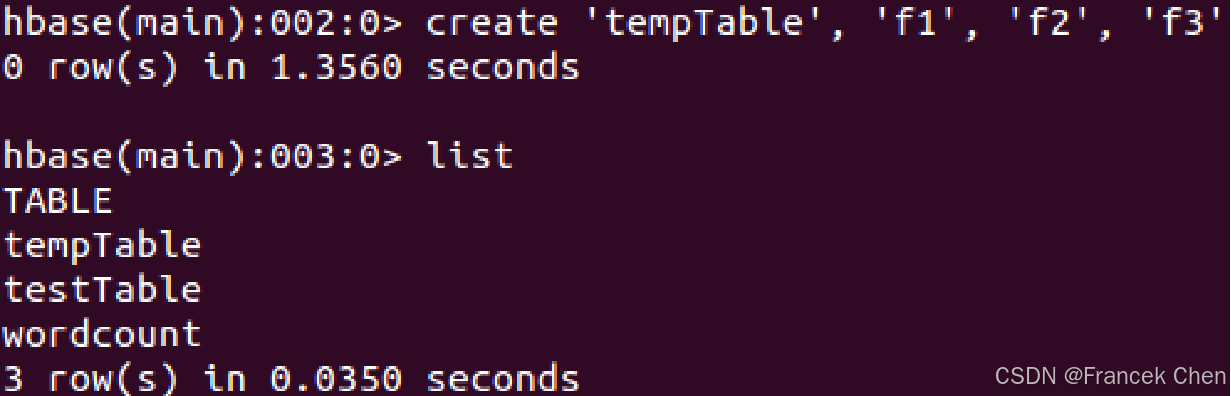
备注:后面的例子都在此基础上继续操作。
put:向表、行、列指定的单元格添加数据; 一次只能为一个表的一行数据的一个列添加一个数据scan:浏览表的相关信息
例子2:继续向表 tempTable 中的第 r1 行、第“f1:c1”列,添加数据值为“hello,dblab”。

在添加数据时,HBase 会自动为添加的数据添加一个时间戳,当然,也可以在添加数据时人工指定时间戳的值。
get:通过表名、行、列、时间戳、时间范围和版本号来获得相应单元格的值
例子3:(1)从 tempTable 中,获取第 r1 行、第“f1:c1”列的值;(2)从 tempTable 中,获取第 r1 行、第“f1:c3”列的值。备注:f1 是列族,c1 和 c3 都是列。
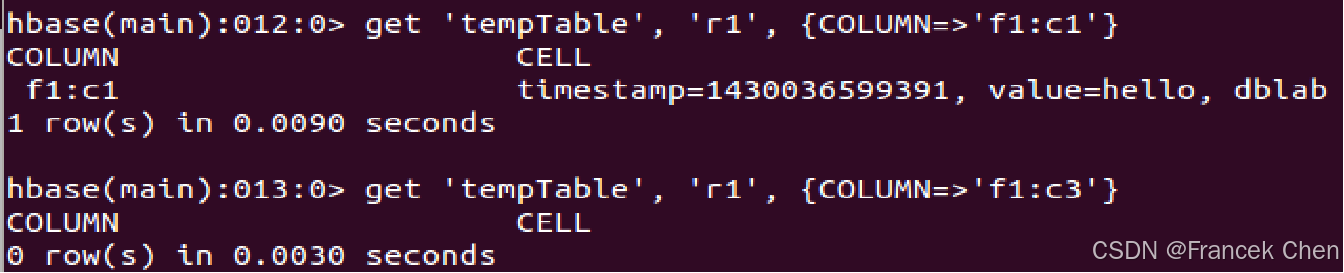
从运行结果可以看出: tempTable 中第 r1 行、第“f1:c3”列的值当前不存在。
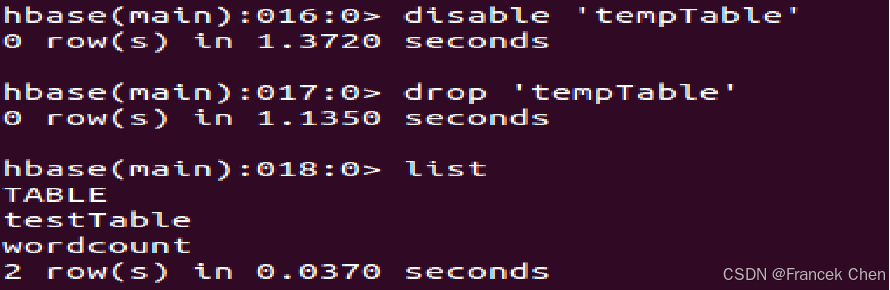
enable/disable:使表有效或无效drop:删除表
例子4:使表 tempTable 无效、删除该表。
三、HBase常用Java API及应用实例
HBase 是 Java 编写的,它的原生的 API 也是 Java 开发的,不过,可以使用 Java 或其他语言调用 API 来访问 HBase。备注:使用的 HBase 版本号为2.5.4。
任务要求:创建表、插入数据、浏览数据
创建一个学生信息表,用来存储学生姓名(姓名作为行键,并且假设姓名不会重复)以及考试成绩,其中,考试成绩是一个列族,分别存储了各个科目的考试成绩。逻辑视图如表所示。
| name | score | ||
|---|---|---|---|
| English | Math | Computer | |
| name | score | ||
|---|---|---|---|
| English | Math | Computer | |
| zhangsan | 69 | 86 | 77 |
| lisi | 55 | 100 | 88 |
import org.apache.hadoop.conf.Configuration;
import org.apache.hadoop.hbase.*;
import org.apache.hadoop.hbase.client.*;
import org.apache.hadoop.hbase.util.Bytes;
import java.io.IOException;

public class Chapter4 {
    public static Configuration configuration;
    public static Connection connection;
    public static Admin admin;

    public static void main(String[] args) throws IOException {
        init(); // 初始化连接
        try {
            createTable("student", new String[]{"score"});
            insertData("student", "zhangsan", "score", "English", "69");
            insertData("student", "zhangsan", "score", "Math", "86");
            insertData("student", "zhangsan", "score", "Computer", "77");
            getData("student", "zhangsan", "score", "English");
        } finally {
            close(); // 确保关闭连接
        }
    }
    ……
    public static void init(){……}//建立连接
    public static void close(){……}//关闭连接
    public static void createTable(){……}//创建表
    public static void insertData() {……}//插入数据
    public static void getData{……}//浏览数据
}
(一)建立连接和关闭连接
// 建立连接(按您提供的代码)
public static void init() {
    configuration = HBaseConfiguration.create();
    configuration.set("hbase.rootdir", "hdfs://localhost:9000/hbase");
    try {
        connection = ConnectionFactory.createConnection(configuration);
        admin = connection.getAdmin();
    } catch (IOException e) {
        e.printStackTrace();
    }
}
备注:hbase-site.xml
<configuration>
<property>
<name>hbase.rootdir</name>
<value>hdfs://localhost:9000/hbase</value>
</property>
</configuration>
// 关闭连接
public static void close() {
    try {
        if (admin != null) {
            admin.close();
        }
        if (connection != null) {
            connection.close();
        }
    } catch (IOException e) {
        e.printStackTrace();
    }
}
(二)创建表
创建一个学生信息表,用来存储学生姓名(姓名作为行键,并且假设姓名不会重复)以及考试成绩,其中,考试成绩是一个列族,分别存储了各个科目的考试成绩。逻辑视图如表1所示。
/* 创建表 */
/**
 * @param myTableName 表名
 * @param colFamily   列族数组
 * @throws Exception
 */
public static void createTable(String myTableName, String[] colFamily) throws IOException {
    TableName tableName = TableName.valueOf(myTableName);
    if (admin.tableExists(tableName)) {
        System.out.println("table is exists!");
    } else {
        TableDescriptorBuilder tableDescriptor = TableDescriptorBuilder.newBuilder(tableName);
        for (String str : colFamily) {
            ColumnFamilyDescriptor family = ColumnFamilyDescriptorBuilder.newBuilder(Bytes.toBytes(str)).build();
            tableDescriptor.setColumnFamily(family);
        }
        admin.createTable(tableDescriptor.build());
    }
}
(三)添加数据
现在向表 student 中添加如表2所示的数据。
/* 添加数据 */
/**
 * @param tableName 表名
 * @param rowKey    行键
 * @param colFamily 列族
 * @param col       列限定符
 * @param val       数据
 * @throws Exception
 */
public static void insertData(String tableName, String rowKey, String colFamily, String col, String val) throws IOException {
    Table table = connection.getTable(TableName.valueOf(tableName));
    Put put = new Put(rowKey.getBytes());
    put.addColumn(colFamily.getBytes(), col.getBytes(), val.getBytes());
    table.put(put);
    table.close();
}
添加数据时,需要分别设置参数 myTableName、rowkey、colFamily、col、val 的值,然后运行上述代码。例如添加表 2 第一行数据时,为 insertData() 方法指定相应参数,并运行如下 3 行代码:
insertData("student","zhangsan","score","English","69");
insertData("student","zhangsan","score","Math","86");
insertData("student","zhangsan","score","Computer","77");
上述代码与如下 HBase Shell 命令等效:
put 'student','zhangsan','score:English','69';
put 'student','zhangsan','score:Math','86';
put 'student','zhangsan','score:Computer','77';
(四)浏览数据
/* 获取某单元格数据 */
/**
 * @param tableName 表名
 * @param rowKey    行键
 * @param colFamily 列族
 * @param col       列限定符
 * @throws IOException
 */
public static void getData(String tableName, String rowKey, String colFamily, String col) throws IOException {
    Table table = connection.getTable(TableName.valueOf(tableName));
    Get get = new Get(rowKey.getBytes());
    get.addColumn(colFamily.getBytes(), col.getBytes());
    Result result = table.get(get);
    System.out.println(new String(result.getValue(colFamily.getBytes(), col == null ? null : col.getBytes())));
    table.close();
}
比如,现在要获取姓名为“zhangsan”在“English”上的数据,就可以在运行上述代码时,指定参数 tableName 为“student”、rowKey 为“zhangsan”、colFamily 为“score”、col 为“English”。
getData("student", "zhangsan", "score", "English");
上述代码与如下 HBase Shell 命令等效:
get 'student','zhangsan',{COLUMN=>'score:English'}
(五)完整代码
import org.apache.hadoop.conf.Configuration;
import org.apache.hadoop.hbase.*;
import org.apache.hadoop.hbase.client.*;
import org.apache.hadoop.hbase.util.Bytes;
import java.io.IOException;

public class ExampleForHBase {
    public static Configuration configuration;
    public static Connection connection;
    public static Admin admin;

    public static void main(String[] args) throws IOException {
        init();
        createTable("student", new String[]{"score"});
        insertData("student", "zhangsan", "score", "English", "69");
        insertData("student", "zhangsan", "score", "Math", "86");
        insertData("student", "zhangsan", "score", "Computer", "77");
        getData("student", "zhangsan", "score", "English");
        close();
    }

    // 建立连接
    public static void init() {
        configuration = HBaseConfiguration.create();
        configuration.set("hbase.rootdir", "hdfs://localhost:9000/hbase");
        try {
            connection = ConnectionFactory.createConnection(configuration);
            admin = connection.getAdmin();
        } catch (IOException e) {
            e.printStackTrace();
        }
    }

    // 关闭连接
    public static void close() {
        try {
            if (admin != null) {
                admin.close();
            }
            if (null != connection) {
                connection.close();
            }
        } catch (IOException e) {
            e.printStackTrace();
        }
    }

    // 建表
    public static void createTable(String myTableName, String[] colFamily) throws IOException {
        TableName tableName = TableName.valueOf(myTableName);
        if (admin.tableExists(tableName)) {
            System.out.println("talbe is exists!");
        } else {
            TableDescriptorBuilder tableDescriptor = TableDescriptorBuilder.newBuilder(tableName);
            for (String str : colFamily) {
                ColumnFamilyDescriptor family = ColumnFamilyDescriptorBuilder.newBuilder(Bytes.toBytes(str)).build();
                tableDescriptor.setColumnFamily(family);
            }
            admin.createTable(tableDescriptor.build());
        }
    }

    // 插入数据
    public static void insertData(String tableName, String rowKey, String colFamily, String col, String val) throws IOException {
        Table table = connection.getTable(TableName.valueOf(tableName));
        Put put = new Put(rowKey.getBytes());
        put.addColumn(colFamily.getBytes(), col.getBytes(), val.getBytes());
        table.put(put);
        table.close();
    }

    // 浏览数据
    public static void getData(String tableName, String rowKey, String colFamily, String col) throws IOException {
        Table table = connection.getTable(TableName.valueOf(tableName));
        Get get = new Get(rowKey.getBytes());
        get.addColumn(colFamily.getBytes(), col.getBytes());
        Result result = table.get(get);
        System.out.println(new String(result.getValue(colFamily.getBytes(), col == null ? null : col.getBytes())));
        table.close();
    }
}
小结
本文介绍了 HBase 的安装配置要点、常用 Shell 命令及 Java API 应用实例。HBase 启动顺序为:先启动 Hadoop,再启动 HBase。单机版可使用自带 Zookeeper,集群版建议独立部署。Shell 命令包括 create 建表、put 插入数据、scan 浏览、get 查询、enable/disable 和 drop 删除表等。Java API 部分以学生成绩表为例,演示了建立连接、创建表、插入数据和浏览数据的完整代码实现。通过对比 Shell 命令与 Java API 的等效操作,帮助理解 HBase 的编程接口使用方式。
欢迎 点赞👍 | 收藏⭐ | 评论✍ | 关注🤗


助力广东及东莞地区开发者,代码托管、在线学习与竞赛、技术交流与分享、资源共享、职业发展,成为松山湖开发者首选的工作与学习平台
更多推荐


 11
11 0
0- 0


 已为社区贡献55条内容

所有评论(0)