WebUI LiuMo Batch:下一代AIGC工作流批量生成平台深度解析
WebUI LiuMo Batch:革新AIGC批量生成的工作流平台 摘要:WebUI LiuMo Batch是一款创新的AIGC工作流管理系统,针对Stable Diffusion等文生图模型传统使用方式的痛点,提供了批量处理、参数管理和工作流复用的解决方案。该平台采用纯前端技术栈,基于"配置即代码"理念,通过JSON配置驱动和智能队列系统实现高效批量生成。核心架构包含全局状
WebUI LiuMo Batch:下一代AIGC工作流批量生成平台深度解析
引言:AIGC工作流优化的新范式
在当今人工智能生成内容(AIGC)爆炸式增长的时代,Stable Diffusion等文生图模型已成为创意工作者和研究人员的重要工具。然而,随着应用场景的不断扩展,传统WebUI的单张图像生成模式已难以满足批量生产、参数对比和工作流管理的复杂需求。正是在这样的背景下,WebUI LiuMo Batch应运而生,它将工作流思维与批量处理能力深度融合,为AIGC创作提供了全新的解决方案。
WebUI LiuMo Batch是由开发者liudef06与DeepSeek v3.2 AI共同打造的创新型批量生成平台,基于现代Web技术栈构建,充分利用了Stable Diffusion WebUI的API接口,通过多标签页管理、JSON配置驱动和智能队列系统三大核心机制,彻底改变了用户与AI图像生成模型的交互方式。本文将从项目架构、核心代码、功能特性、应用场景等多个维度对这一开源项目进行全面剖析。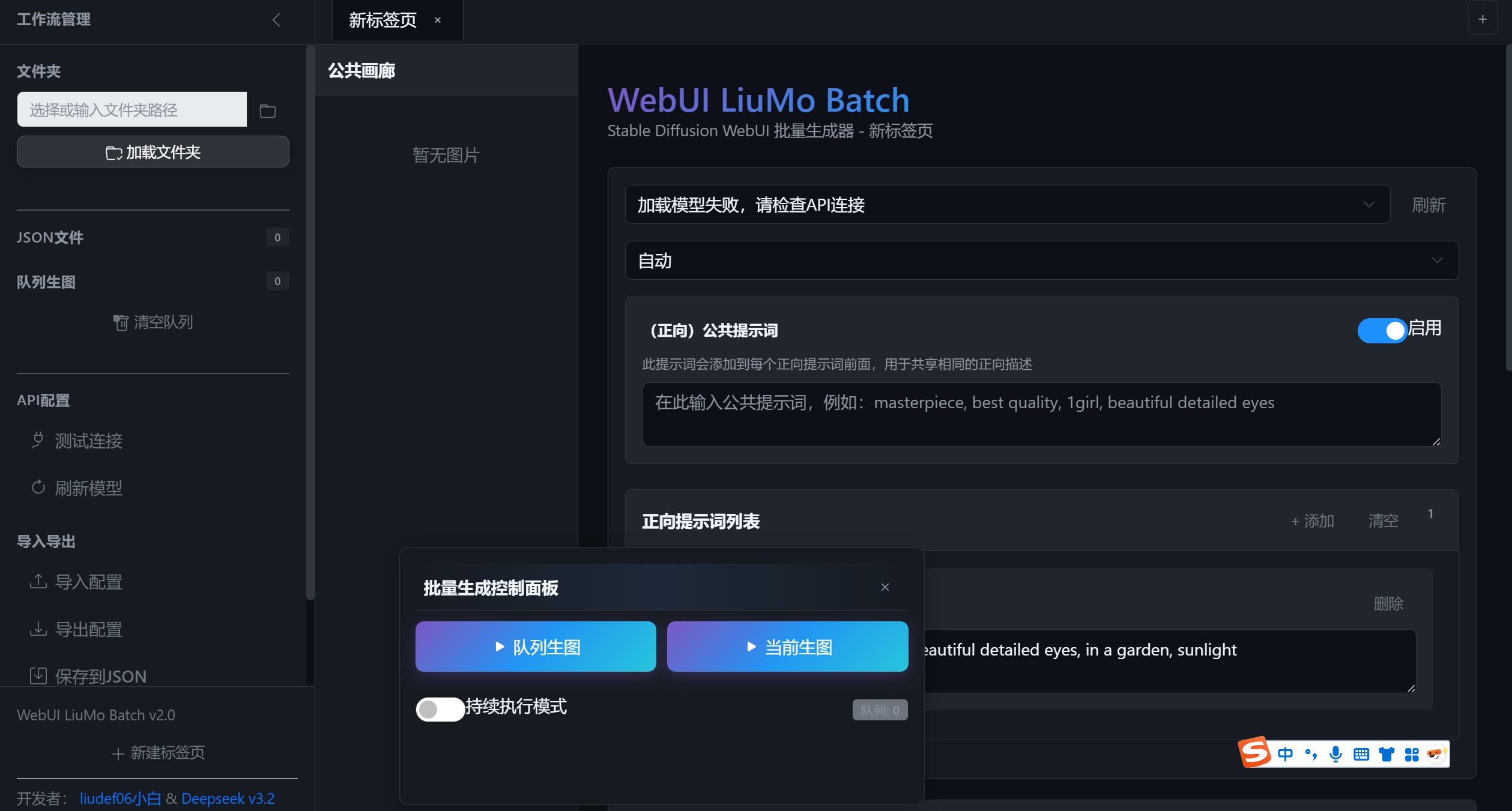
一、项目概述与核心价值
1.1 项目定位与特色
WebUI LiuMo Batch并非简单的界面封装,而是一个完整的AIGC工作流管理系统。它解决了传统使用方式中的多个痛点:
- 批量处理效率低下:传统方式需手动逐张调整参数并生成
- 参数管理混乱:难以系统化管理大量提示词组合和参数配置
- 工作流不可复用:成功的生成配置无法轻松保存和重复使用
- 进度监控缺失:缺乏对长时间批量任务的实时监控机制
该项目以 “配置即代码” 为核心理念,将复杂的生成参数封装为结构化的JSON配置文件,通过可视化界面进行管理,同时保留了代码级配置的灵活性和可复用性。
1.2 技术架构概览
WebUI LiuMo Batch采用纯前端技术栈实现,主要包含以下层次:
- 呈现层:基于HTML5、CSS3和SVG图标系统,采用深色主题设计
- 交互层:使用原生JavaScript实现,无第三方框架依赖
- 通信层:通过Fetch API与Stable Diffusion WebUI的REST API交互
- 状态管理层:自定义的AppState全局状态管理机制
- 数据持久层:基于浏览器LocalStorage的配置保存和恢复
下表展示了项目的核心功能模块及其相互关系:
| 模块名称 | 主要功能 | 技术实现 | 依赖关系 |
|---|---|---|---|
| 侧边栏管理 | 文件浏览、队列管理、API配置 | CSS变量主题、折叠动画 | 独立模块 |
| 标签页系统 | 多配置并行编辑、快速切换 | 动态DOM操作、事件委托 | 状态管理 |
| 队列引擎 | 任务调度、进度监控、错误处理 | Promise链、异步控制 | API通信 |
| 浮动控制面板 | 实时控制、进度显示、拖拽交互 | 绝对定位、拖拽事件 | 队列引擎 |
| 配置管理器 | JSON导入导出、参数解析 | JSON序列化、文件API | 标签页系统 |
| 图片画廊 | 生成结果预览、元数据显示 | 栅格布局、模态框 | 状态管理 |
二、核心架构深度解析
2.1 全局状态管理设计
项目的核心是精心设计的全局状态管理对象 AppState,它采用单例模式管理整个应用的状态:
const AppState = {
    // 侧边栏状态
    sidebarCollapsed: false,

    // JSON文件管理
    jsonFiles: [], // {name: string, path: string, content: object, lastModified: Date}
    selectedJsonPath: null,

    // 执行队列
    executionQueue: [], // {jsonPath: string, jsonName: string, config: object, status: string}
    isQueueRunning: false,

    // 标签页管理
    tabs: [],
    activeTabId: null,
    nextTabId: 1,

    // 公共图片画廊(所有任务生成的图片)
    commonGallery: [], // {id: string, tabId: string, jsonName: string, prompt: string, seed: number, imageBase64: string, timestamp: Date, info: object, generationTime: number}

    // 全局配置
    apiUrl: 'http://127.0.0.1:7860',
    currentFolderPath: null,

    // 模型和VAE列表
    sdModels: [],
    vaeModels: [],

    // 模型加载状态
    modelsLoaded: false,

    // 全局任务ID计数器
    nextTaskId: 1,

    // 进度查询定时器
    progressTimer: null,
    originalTitle: null,

    // 执行状态
    isExecutionRunning: false,
    isContinuousMode: false,
    currentExecutionStartTime: null,
    currentExecutionType: null, // 'queue' 或 'current'
    currentProgress: {
        current: 0,
        total: 0,
        currentTaskName: '',
        startTime: null
    },

    // 单张图片进度
    currentImageProgress: 0,

    // 当前查看的图片索引
    currentImageIndex: 0,

    // 控制面板状态
    floatingPanelState: {
        isVisible: true,
        position: { x: null, y: null },
        isDragging: false,
        dragOffset: { x: 0, y: 0 }
    }
};
这种设计有几个关键优势:
- 状态集中管理:所有应用状态集中在一个对象中,便于调试和持久化
- 响应式更新:状态变化后通过专门函数更新UI,保持一致性
- 序列化友好:便于保存到LocalStorage或导出为备份
- 类型清晰:通过详细的注释说明每个字段的用途和结构
2.2 响应式UI更新机制
项目采用手动DOM更新而非虚拟DOM方案,通过精心设计的更新函数实现高效UI同步:
function updateJsonList() {
    dom.jsonList.innerHTML = '';
    dom.jsonCount.textContent = AppState.jsonFiles.length;

    AppState.jsonFiles.forEach((jsonFile, index) => {
        const li = document.createElement('li');
        li.className = `json-item ${AppState.sidebarCollapsed ? 'collapsed' : ''}`;
        if (jsonFile.path === AppState.selectedJsonPath) {
            li.classList.add('active');
        }

        // 条件渲染:侧边栏折叠时显示图标,展开时显示完整信息
        li.innerHTML = AppState.sidebarCollapsed ?
            // 折叠状态HTML
            `<svg>...</svg>` :
            // 展开状态HTML
            `
                <div class="json-name" title="${jsonFile.name}">${jsonFile.name}</div>
                <div class="json-actions">
                    <button class="json-action-btn add-queue" title="添加到队列" data-index="${index}">
                        <svg>...</svg>
                    </button>
                    <div class="json-badge">${jsonFile.content.version || 'v1.0'}</div>
                </div>
            `;

        // 事件绑定
        li.addEventListener('click', () => openJsonInTab(jsonFile));

        // 添加队列按钮事件
        if (!AppState.sidebarCollapsed) {
            const addQueueBtn = li.querySelector('.add-queue');
            addQueueBtn.addEventListener('click', (e) => {
                e.stopPropagation();
                addToQueue(jsonFile);
            });
        }

        dom.jsonList.appendChild(li);
    });
}
这种更新模式的优点包括:
- 精确控制:只更新必要的DOM元素,避免不必要的重绘
- 条件渲染:根据应用状态(如侧边栏折叠状态)动态调整显示内容
- 事件委托优化:在元素创建时直接绑定事件,避免全局事件委托的开销
- 内存管理:每次更新前清空容器,避免内存泄漏
2.3 API通信与错误处理
与Stable Diffusion WebUI的通信通过统一的API层实现:
async function generateImageWithConfig(config, prompt, taskName) {
    // 获取API URL
    const apiUrl = config.apiUrl || AppState.apiUrl;

    // 准备请求参数
    const params = {
        prompt: prompt,
        negative_prompt: config.globalParams.negativePrompt || '',
        seed: config.globalParams.seed === -1 ? -1 : parseInt(config.globalParams.seed),
        steps: parseInt(config.globalParams.steps),
        width: parseInt(config.globalParams.width),
        height: parseInt(config.globalParams.height),
        cfg_scale: parseFloat(config.globalParams.cfgScale),
        sampler_name: config.globalParams.sampler || 'DPM++ 2M Karras',
        batch_size: 1,
        n_iter: 1,
        save_images: config.globalParams.autoSave !== false
    };

    // 添加模型信息
    if (config.globalParams.sdModel) {
        params.override_settings = {
            sd_model_checkpoint: config.globalParams.sdModel
        };
    }

    // 错误处理和超时控制
    const controller = new AbortController();
    const timeoutId = setTimeout(() => controller.abort(), 300000); // 5分钟超时

    try {
        const response = await fetch(`${apiUrl}/sdapi/v1/txt2img`, {
            method: 'POST',
            headers: { 'Content-Type': 'application/json' },
            body: JSON.stringify(params),
            signal: controller.signal
        });

        clearTimeout(timeoutId);

        if (!response.ok) {
            throw new Error(`API请求失败: ${response.status} ${response.statusText}`);
        }

        const result = await response.json();

        // 验证响应数据
        if (!result.images || result.images.length === 0) {
            throw new Error('API返回的图片为空');
        }

        // 标准化图片数据格式
        let imageData = result.images[0];
        if (!imageData.startsWith('data:')) {
            imageData = `data:image/png;base64,${imageData}`;
        }

        return {
            image: imageData,
            seed: result.seed || config.globalParams.seed,
            info: result.info || {}
        };

    } catch (error) {
        clearTimeout(timeoutId);
        throw new Error(`生图失败: ${error.message}`);
    }
}
API层的设计特色:
- 参数标准化:将前端配置转换为WebUI API要求的格式
- 超时控制:防止长时间挂起的请求阻塞系统
- 错误恢复:详细的错误分类和处理策略
- 数据验证:确保API响应符合预期格式
三、关键模块实现详解
3.1 标签页系统:多工作流并行管理
标签页系统是WebUI LiuMo Batch的核心创新之一,它允许用户同时管理多个生成配置:
function createNewTab(name, jsonFile = null) {
    const tabId = `tab-${AppState.nextTabId++}`;

    const tab = {
        id: tabId,
        name: name,
        jsonPath: jsonFile?.path || null,
        jsonName: jsonFile?.name || null,
        state: createTabState()
    };

    AppState.tabs.push(tab);
    AppState.activeTabId = tabId;

    // 创建Tab页头
    createTabHeader(tab);

    // 创建Tab内容
    createTabContent(tab);

    // 更新Tab显示
    updateTabDisplay();

    return tabId;
}

function createTabState() {
    return {
        prompts: [{
            id: 1,
            label: '示例提示词',
            text: 'masterpiece, best quality, 1girl, beautiful detailed eyes, in a garden, sunlight'
        }],
        nextId: 2,
        isGenerating: false,
        currentQueue: [],
        results: [],
        autoSaveEnabled: true,
        maxHistoryImages: 10,
        commonPrompt: '' // 正向公共提示词
    };
}
标签页系统的技术特点:
- 独立状态隔离:每个标签页拥有完全独立的状态对象
- 资源标识系统:使用
tab-{id}格式确保DOM元素ID唯一性 - 懒加载设计:标签页内容仅在激活时渲染,优化性能
- 状态快照:支持将标签页状态保存为JSON配置
3.2 队列引擎:智能任务调度
队列引擎负责管理批量生成任务的执行顺序、状态跟踪和错误处理:
async function startQueueExecution() {
    if (AppState.executionQueue.length === 0) {
        showNotification('队列为空', 'warning');
        return;
    }

    if (AppState.isQueueRunning) {
        showNotification('队列正在执行中', 'info');
        return;
    }

    AppState.isQueueRunning = true;
    AppState.currentExecutionType = 'queue';
    AppState.currentExecutionStartTime = new Date();

    // 计算总任务数(所有JSON文件的提示词总数)
    let totalPrompts = 0;
    AppState.executionQueue.forEach(queueItem => {
        if (queueItem.config && queueItem.config.prompts) {
            totalPrompts += queueItem.config.prompts.length;
        }
    });

    // 进度管理初始化
    AppState.currentProgress = {
        current: 0,
        total: totalPrompts,
        currentTaskName: '',
        currentTaskIndex: 0
    };

    // 执行循环设计:支持连续执行模式
    do {
        for (let i = 0; i < AppState.executionQueue.length; i++) {
            if (!AppState.isQueueRunning) break;

            const queueItem = AppState.executionQueue[i];
            queueItem.status = 'running';
            updateQueueList();

            // 更新进度信息
            AppState.currentProgress.currentTaskName = queueItem.jsonName;
            AppState.currentProgress.currentTaskIndex = i + 1;
            updateProgressDisplay();

            try {
                await executeJsonGeneration(queueItem, AppState.currentProgress);
                queueItem.status = 'completed';
                showNotification(`完成: ${queueItem.jsonName}`, 'success');
            } catch (error) {
                queueItem.status = 'failed';
                showNotification(`失败: ${queueItem.jsonName}: ${error.message}`, 'danger');
                // 错误继续:即使单个任务失败,队列继续执行
            }

            updateQueueList();
        }

        // 连续执行模式支持
        if (AppState.isContinuousMode && AppState.isQueueRunning) {
            showNotification('开始新一轮队列执行', 'info');
            // 重置队列状态
            AppState.executionQueue.forEach(item => {
                item.status = 'pending';
            });
            AppState.currentProgress.current = 0;
        }

    } while (AppState.isContinuousMode && AppState.isQueueRunning);

    // 清理工作
    AppState.isQueueRunning = false;
    AppState.currentExecutionType = null;
    stopProgressPolling();
    updateExecutionButtons(false);
    showNotification('队列执行完成', 'success');
}
队列引擎的核心特性:
| 特性 | 实现机制 | 优势 |
|---|---|---|
| 任务状态跟踪 | pending/running/completed/failed四状态模型 | 清晰的执行进度可视化 |
| 错误隔离 | 单任务错误不影响队列继续执行 | 提高批量任务成功率 |
| 连续执行模式 | 循环执行队列直到手动停止 | 适合长期稳定运行场景 |
| 进度实时更新 | 浏览器标题+浮动面板双重显示 | 多任务监控便捷 |
| 资源释放 | 执行完成自动清理定时器和状态 | 避免内存泄漏 |
3.3 浮动控制面板:交互设计创新
浮动控制面板是项目的UI设计亮点,实现了可拖拽、可最小化的控制中心:
function setupDragAndDrop() {
    const panel = dom.floatingControlPanel;
    const header = panel.querySelector('.floating-control-panel-header');

    let isDragging = false;
    let startX, startY;
    let initialLeft, initialTop;

    // 鼠标拖拽实现
    header.addEventListener('mousedown', startDrag);

    function startDrag(e) {
        isDragging = true;
        startX = e.clientX;
        startY = e.clientY;

        const rect = panel.getBoundingClientRect();
        initialLeft = rect.left;
        initialTop = rect.top;

        panel.classList.add('dragging');

        document.addEventListener('mousemove', drag);
        document.addEventListener('mouseup', stopDrag);
    }

    function drag(e) {
        if (!isDragging) return;

        const dx = e.clientX - startX;
        const dy = e.clientY - startY;

        let newLeft = initialLeft + dx;
        let newTop = initialTop + dy;

        // 边界检查:确保面板在视窗内
        const maxX = window.innerWidth - panel.offsetWidth;
        const maxY = window.innerHeight - panel.offsetHeight;

        newLeft = Math.max(0, Math.min(newLeft, maxX));
        newTop = Math.max(0, Math.min(newTop, maxY));

        panel.style.left = `${newLeft}px`;
        panel.style.top = `${newTop}px`;
        panel.style.transform = 'none';

        // 保存位置状态
        AppState.floatingPanelState.position.x = newLeft;
        AppState.floatingPanelState.position.y = newTop;
    }

    function stopDrag() {
        if (!isDragging) return;

        isDragging = false;
        panel.classList.remove('dragging');
        savePanelState(); // 保存到本地存储

        document.removeEventListener('mousemove', drag);
        document.removeEventListener('mouseup', stopDrag);
    }
}
浮动面板的设计哲学:
- 不打扰原则:可拖拽到屏幕任何位置,避免遮挡工作区
- 状态持久化:位置和可见性状态自动保存
- 最小化模式:不需要时可缩为小图标,节省屏幕空间
- 实时反馈:执行状态通过颜色和动画直观显示
3.4 图片参数导入:逆向工程创新
项目实现了从已有图片中提取生成参数的创新功能:
async function extractImageInfo(file) {
    try {
        // 将图片转换为base64
        const imageBase64 = await new Promise((resolve, reject) => {
            const reader = new FileReader();
            reader.onload = () => resolve(reader.result.split(',')[1]);
            reader.onerror = reject;
            reader.readAsDataURL(file);
        });

        // 调用WebUI的png-info API
        const response = await fetch(`${AppState.apiUrl}/sdapi/v1/png-info`, {
            method: 'POST',
            headers: { 'Content-Type': 'application/json' },
            body: JSON.stringify({ image: `data:image/png;base64,${imageBase64}` })
        });

        if (!response.ok) throw new Error(`API请求失败: ${response.status}`);

        const data = await response.json();

        if (!data.info) throw new Error('图片中未找到生成信息');

        // 解析生成信息
        return parseGenerationInfo(data.info);

    } catch (error) {
        // 备用方案:手动解析PNG文件的tEXt块
        return await extractPNGInfoManually(file);
    }
}

function parseGenerationInfo(infoString) {
    const result = {
        prompt: '',
        negativePrompt: '',
        sampler: '',
        steps: 20,
        cfgScale: 7,
        seed: -1,
        width: 512,
        height: 512,
        model: '',
        hires: { enable: false, scale: 2, denoiseStrength: 0.7, upscaler: 'Latent' }
    };

    // 多种格式解析逻辑
    if (infoString.trim().startsWith('{')) {
        // JSON格式解析
        try {
            const jsonInfo = JSON.parse(infoString);
            // 提取关键参数...
        } catch (e) { /* 回退到文本解析 */ }
    }

    // 文本格式解析(常见SD格式)
    const lines = infoString.split('\n');
    // 复杂的文本解析逻辑...

    return result;
}
此功能的技术价值:
- 工作流逆向:从结果反推参数,实现"效果复用"
- 多格式支持:兼容JSON和文本两种常见参数格式
- 错误恢复:主API失败时自动使用备用解析方案
- 智能匹配:尝试匹配当前可用的模型和采样器
四、配置文件系统与数据流
4.1 JSON配置规范
WebUI LiuMo Batch定义了一套完整的JSON配置规范:
{
    "version": "2.0",
    "exportDate": "2025-01-04T10:30:00.000Z",
    "globalParams": {
        "sdModel": "dreamshaper_8.safetensors",
        "vaeModel": "Automatic",
        "negativePrompt": "lowres, bad anatomy, worst quality, low quality",
        "sampler": "DPM++ 2M Karras",
        "steps": 25,
        "width": 512,
        "height": 768,
        "cfgScale": 7,
        "seed": -1,
        "batchCount": 1,
        "clipSkip": 1,
        "enableHr": false,
        "hrScale": 2,
        "denoiseStrength": 0.7,
        "hrUpscaler": "Latent",
        "hrSecondPassSteps": 0,
        "autoSave": true
    },
    "commonPrompt": "masterpiece, best quality, 1girl, beautiful detailed eyes",
    "prompts": [
        {
            "label": "花园场景",
            "text": "in a garden, sunlight, cherry blossoms"
        },
        {
            "label": "室内场景",
            "text": "indoors, cozy room, window light, reading book"
        }
    ],
    "apiUrl": "http://127.0.0.1:7860"
}
配置文件的设计原则:
- 语义化字段:字段名直观反映功能
- 版本控制:包含version字段便于未来格式升级
- 完整上下文:包含生成所需的所有参数
- 可读性优先:合理的缩进和结构便于手动编辑
4.2 数据流架构
项目的完整数据流涉及多个组件间的协作:
用户操作 → 事件处理器 → 状态更新 → UI渲染 → API调用 → 结果处理 → 状态更新 → UI反馈
     ↓          ↓           ↓          ↓         ↓          ↓           ↓         ↓
   点击按钮 → 解析参数 → 更新AppState → 重绘DOM → 调用SD API → 保存图片 → 更新画廊 → 显示通知
关键数据转换节点:
- UI到配置:表单输入转换为JSON配置对象
- 配置到API参数:前端配置转换为WebUI API参数
- API响应到状态:生成结果转换为应用状态
- 状态到持久化:应用状态保存为LocalStorage或文件
五、项目中的关键技术栈应用
5.1 现代CSS特性应用
项目大量使用CSS自定义属性和现代布局技术:
:root {
    /* CSS变量定义 - 主题系统 */
    --bg-primary: #0d1117;
    --bg-secondary: #161b22;
    --bg-tertiary: #21262d;
    --border-color: #30363d;
    --text-primary: #f0f6fc;
    --text-secondary: #8b949e;
    --accent-color: #238636;
    --accent-hover: #2ea043;
    --sidebar-width: 300px;
    --sidebar-collapsed-width: 60px;
}

/* CSS Grid布局 - 图片画廊 */
.common-gallery-content {
    display: grid;
    grid-template-columns: repeat(auto-fill, minmax(150px, 1fr));
    gap: 0.5rem;
}

/* Flexbox布局 - 自适应界面 */
.app-container {
    display: flex;
    min-height: 100vh;
}

/* 现代选择器和伪类 */
.image-thumb:hover .image-info {
    opacity: 1;
    transition: opacity 0.2s;
}

/* 响应式设计 */
@media (max-width: 768px) {
    .floating-control-panel {
        min-width: 90%;
        left: 5%;
        transform: none;
    }
}
CSS设计的亮点:
- 设计令牌系统:通过CSS变量统一设计规范
- 响应式断点:针对不同屏幕尺寸优化布局
- 性能优化:使用transform和opacity实现高效动画
- 可维护性:模块化的CSS结构便于扩展
5.2 JavaScript设计模式应用
项目中应用了多种经典设计模式:
| 设计模式 | 应用场景 | 代码示例 |
|---|---|---|
| 单例模式 | 全局状态管理 | AppState 全局对象 |
| 观察者模式 | 事件通知系统 | showNotification 函数 |
| 工厂模式 | 标签页创建 | createNewTab 函数 |
| 策略模式 | 图片解析器 | parseGenerationInfo 支持多种格式 |
| 命令模式 | 队列任务 | executionQueue 中的任务对象 |
| 备忘录模式 | 状态持久化 | saveToLocalStorage 函数 |
这些模式的应用使代码:
- 结构清晰:各模块职责明确,耦合度低
- 易于测试:独立的功能单元便于单元测试
- 可扩展性强:新功能可通过添加新策略实现
- 维护成本低:标准化的模式降低理解成本
六、API接口封装与通信机制
6.1 WebUI API封装层
项目实现了对Stable Diffusion WebUI API的完整封装:
// API端点映射表
const API_ENDPOINTS = {
    SD_MODELS: '/sdapi/v1/sd-models',
    SD_VAE: '/sdapi/v1/sd-vae',
    TXT2IMG: '/sdapi/v1/txt2img',
    PNG_INFO: '/sdapi/v1/png-info',
    PROGRESS: '/sdapi/v1/progress',
    OPTIONS: '/sdapi/v1/options'
};

// 统一的API请求函数
async function callWebUIApi(endpoint, method = 'GET', data = null) {
    const url = `${AppState.apiUrl}${endpoint}`;
    const options = {
        method,
        headers: { 'Content-Type': 'application/json' }
    };

    if (data && (method === 'POST' || method === 'PUT')) {
        options.body = JSON.stringify(data);
    }

    try {
        const response = await fetch(url, options);

        if (!response.ok) {
            throw new Error(`API请求失败 (${response.status}): ${await response.text()}`);
        }

        return await response.json();
    } catch (error) {
        console.error(`API调用失败 [${endpoint}]:`, error);
        throw error;
    }
}
6.2 进度监控与实时反馈
项目实现了细粒度的进度监控系统:
function startProgressPolling() {
    // 清除现有定时器
    if (AppState.progressTimer) {
        clearInterval(AppState.progressTimer);
    }

    // 启动新定时器
    AppState.progressTimer = setInterval(async () => {
        try {
            const progressData = await callWebUIApi(API_ENDPOINTS.PROGRESS);

            // 更新单张图片进度
            if (progressData.progress !== undefined) {
                AppState.currentImageProgress = progressData.progress;
                updateSingleImageProgress();
            }

            // 更新标题栏进度显示
            updateTitleProgress();

            // 更新浮动控制面板
            updateProgressDisplay();

        } catch (error) {
            console.warn('进度查询失败:', error);
        }
    }, 500); // 500ms轮询间隔
}
进度监控的特点:
- 双级进度:同时跟踪总任务进度和单图生成进度
- 实时反馈:500ms更新频率确保及时反馈
- 多位置显示:标题栏、控制面板、任务栏多重显示
- 错误容忍:进度查询失败不影响主任务
七、性能优化与内存管理
7.1 图片数据的内存管理
批量生成可能产生大量图片数据,项目实现了有效的内存管理:
// 图片数据生命周期管理
function addToGallery(imageData) {
    // 添加到公共画廊
    AppState.commonGallery.unshift(imageData);

    // 限制画廊大小,防止内存溢出
    const MAX_GALLERY_SIZE = 50;
    if (AppState.commonGallery.length > MAX_GALLERY_SIZE) {
        // 移除最旧的图片,释放内存
        const removed = AppState.commonGallery.splice(MAX_GALLERY_SIZE);

        // 可选:通知用户
        if (removed.length > 0) {
            console.log(`清理了 ${removed.length} 张旧图片以释放内存`);
        }
    }

    // 触发UI更新
    updateCommonGallery();
}

// Base64图片数据的优化处理
function optimizeImageStorage(imageBase64) {
    // 对于缩略图,可以使用降低质量的方法
    if (imageBase64.length > 1024 * 1024) { // 大于1MB
        console.warn('大图片数据,考虑优化存储策略');
        // 实际应用中可实现压缩或外部存储
    }
    return imageBase64;
}
7.2 DOM性能优化
针对频繁的UI更新,项目实施了多项优化:
// 批量DOM操作优化
function batchUpdatePrompts(tabId) {
    // 使用文档片段减少重排
    const fragment = document.createDocumentFragment();
    const tab = AppState.tabs.find(t => t.id === tabId);

    tab.state.prompts.forEach(prompt => {
        const item = createPromptElement(prompt);
        fragment.appendChild(item);
    });

    // 一次性更新DOM
    const container = document.querySelector(`#prompts-container-${tabId}`);
    container.innerHTML = '';
    container.appendChild(fragment);
}

// 事件委托优化
function setupGlobalEventDelegation() {
    // 使用事件委托减少事件监听器数量
    document.addEventListener('click', (e) => {
        // 提示词删除按钮
        if (e.target.classList.contains('delete-prompt-btn')) {
            const id = e.target.closest('.prompt-item').dataset.id;
            removePromptItem(getCurrentTabId(), parseInt(id));
        }

        // 队列控制按钮
        if (e.target.closest('.queue-btn')) {
            const index = e.target.closest('.queue-item').dataset.index;
            handleQueueButtonClick(e.target, parseInt(index));
        }
    });
}
八、安全性与错误处理
8.1 输入验证与清理
所有用户输入都经过严格验证:
function validateAndSanitizeInput(input, type) {
    switch (type) {
        case 'prompt':
            // 移除潜在的危险脚本
            return input.replace(/<script\b[^<]*(?:(?!<\/script>)<[^<]*)*<\/script>/gi, '');

        case 'apiUrl':
            // 验证URL格式
            const urlPattern = /^(http|https):\/\/[^ "]+$/;
            if (!urlPattern.test(input)) {
                throw new Error('无效的API URL格式');
            }
            return input;

        case 'jsonContent':
            // 验证JSON结构
            try {
                const parsed = JSON.parse(input);
                // 验证必需字段
                if (!parsed.version || !parsed.globalParams) {
                    throw new Error('无效的JSON配置格式');
                }
                return parsed;
            } catch (e) {
                throw new Error(`JSON解析失败: ${e.message}`);
            }

        default:
            return input;
    }
}
8.2 全面的错误处理策略
项目实现了分层的错误处理机制:
async function executeWithErrorHandling(operation, context = {}) {
    try {
        showNotification(`开始: ${context.name || '操作'}`, 'info');
        const result = await operation();
        showNotification(`完成: ${context.name || '操作'}`, 'success');
        return result;

    } catch (error) {
        console.error(`操作失败 [${context.name || '未知'}]:`, error);

        // 分类错误处理
        if (error.message.includes('网络') || error.message.includes('Network')) {
            showNotification('网络错误,请检查连接', 'danger');
        } else if (error.message.includes('API') || error.message.includes('请求')) {
            showNotification('API服务异常,请检查WebUI状态', 'danger');
        } else if (error.message.includes('JSON') || error.message.includes('解析')) {
            showNotification('数据格式错误', 'danger');
        } else {
            showNotification(`操作失败: ${error.message}`, 'danger');
        }

        // 错误恢复逻辑
        if (context.recoverable) {
            await attemptRecovery(context);
        }

        throw error; // 重新抛出供上层处理
    }
}
九、扩展性与插件架构
9.1 模块化的扩展接口
项目设计了可扩展的架构:
// 扩展点定义
const EXTENSION_POINTS = {
    BEFORE_GENERATION: 'beforeGeneration',
    AFTER_GENERATION: 'afterGeneration',
    CONFIG_LOAD: 'configLoad',
    CONFIG_SAVE: 'configSave',
    UI_RENDER: 'uiRender'
};

// 插件管理器
class PluginManager {
    constructor() {
        this.plugins = new Map();
        this.hooks = new Map();

        // 初始化所有扩展点
        Object.values(EXTENSION_POINTS).forEach(point => {
            this.hooks.set(point, []);
        });
    }

    registerPlugin(plugin) {
        this.plugins.set(plugin.name, plugin);

        // 注册插件钩子
        if (plugin.hooks) {
            Object.entries(plugin.hooks).forEach(([point, callback]) => {
                if (this.hooks.has(point)) {
                    this.hooks.get(point).push(callback);
                }
            });
        }
    }

    async triggerHook(point, data) {
        const hooks = this.hooks.get(point) || [];

        for (const hook of hooks) {
            try {
                data = await hook(data) || data;
            } catch (error) {
                console.error(`插件钩子执行失败 [${point}]:`, error);
            }
        }

        return data;
    }
}

// 使用示例:生成前处理
async function generateImageWithPlugins(config, prompt) {
    const pluginManager = AppState.pluginManager;

    // 触发生成前钩子
    let processedConfig = await pluginManager.triggerHook(
        EXTENSION_POINTS.BEFORE_GENERATION,
        { config, prompt }
    );

    // 执行生成
    const result = await generateImageWithConfig(
        processedConfig.config,
        processedConfig.prompt
    );

    // 触发生成后钩子
    const finalResult = await pluginManager.triggerHook(
        EXTENSION_POINTS.AFTER_GENERATION,
        result
    );

    return finalResult;
}
十、实际应用场景与案例
10.1 角色设计批量生成
假设游戏角色设计师需要生成同一角色在不同场景中的表现:
{
    "commonPrompt": "masterpiece, best quality, 1girl, silver hair, blue eyes, fantasy armor",
    "prompts": [
        {"label": "战斗姿态", "text": "in battle stance, holding sword, dramatic lighting"},
        {"label": "休闲场景", "text": "resting at campfire, night sky, stars"},
        {"label": "城镇中", "text": "in medieval town, marketplace, daylight"},
        {"label": "魔法释放", "text": "casting spell, magical energy, glowing runes"}
    ]
}
设计师可以:
- 一次性导入所有场景配置
- 批量生成所有变体
- 通过公共画廊对比效果
- 导出成功配置供团队复用
10.2 参数对比研究
AI研究者需要对比不同参数对生成结果的影响:
// 创建参数对比矩阵
const paramMatrix = {
    samplers: ['Euler a', 'DPM++ 2M Karras', 'DDIM'],
    cfgScales: [5, 7, 9, 11],
    steps: [20, 30, 40, 50]
};

// 自动生成所有组合
const allCombinations = generateParamCombinations(paramMatrix);

// 批量执行并记录结果
allCombinations.forEach((params, index) => {
    addToQueue({
        name: `实验_${index + 1}`,
        config: {
            globalParams: { ...baseConfig, ...params },
            prompts: [{ text: "standard test prompt for comparison" }]
        }
    });
});
10.3 商业应用工作流
电商内容创作团队的商品图生成流程:
| 阶段 | 传统方式 | 使用LiuMo Batch |
|---|---|---|
| 需求分析 | 手动记录需求 | 创建需求配置模板 |
| 参数配置 | 每张图单独调整 | 批量应用参数模板 |
| 批量生成 | 手动逐张生成 | 自动队列执行 |
| 效果审核 | 文件夹中查找对比 | 画廊中并排对比 |
| 选定优化 | 重新调整参数重试 | 修改配置后重新队列 |
| 交付存档 | 文件散落各处 | 完整配置+结果打包 |
十一、项目部署与使用指南
11.1 本地部署步骤
-
环境准备:
# 1. 确保已安装Stable Diffusion WebUI # 2. 启动WebUI时添加API参数 ./webui.sh --api # 3. 获取LiuMo Batch代码 git clone https://gitcode.com/Liudef06/liumo-base.git -
快速启动:
# 方法1:直接打开HTML文件 open liumo-base/index.html # 方法2:使用本地HTTP服务器 python -m http.server 8000 # 然后访问 http://localhost:8000 -
配置连接:
- 在侧边栏API配置中输入WebUI地址(默认
http://127.0.0.1:7860) - 点击"测试连接"验证
- 点击"刷新模型"加载可用模型
- 在侧边栏API配置中输入WebUI地址(默认
11.2 高级配置选项
// 自定义配置示例
const customConfig = {
    // 界面定制
    ui: {
        theme: 'dark', // 'dark' | 'light' | 'auto'
        language: 'zh-CN', // 界面语言
        defaultTabCount: 3, // 启动时创建的标签页数
        autoSaveInterval: 300000 // 自动保存间隔(ms)
    },

    // 生成设置
    generation: {
        defaultSteps: 25,
        defaultWidth: 512,
        defaultHeight: 768,
        defaultSampler: 'DPM++ 2M Karras',
        maxQueueSize: 100, // 队列最大任务数
        retryFailed: true, // 自动重试失败任务
        retryCount: 3 // 最大重试次数
    },

    // 存储设置
    storage: {
        maxHistoryImages: 50,
        enableLocalStorage: true,
        exportFormat: 'json', // 'json' | 'yaml'
        backupInterval: 3600000 // 自动备份间隔(ms)
    }
};
十二、未来发展方向与社区贡献
12.1 技术演进路线
基于当前架构,项目有几个明确的演进方向:
-
插件生态系统:
- 官方插件市场
- 第三方插件审核机制
- 插件沙盒安全环境
-
云原生支持:
- 分布式任务队列
- 多WebUI实例负载均衡
- 云端配置同步
-
AI增强功能:
- 提示词智能优化
- 自动参数调优
- 生成结果智能分类
12.2 社区贡献指南
项目采用开放协作模式,欢迎多种形式的贡献:
| 贡献类型 | 技能要求 | 入门任务 |
|---|---|---|
| 代码贡献 | JavaScript/CSS | 修复已知issue、添加测试用例 |
| 文档改进 | 技术写作 | 完善使用文档、添加教程 |
| 插件开发 | 前端开发 | 开发实用插件、工具集成 |
| 问题反馈 | 产品使用 | 提交bug报告、功能建议 |
| 社区支持 | 沟通能力 | 回答用户问题、社区管理 |
关键资源链接:
- 项目主页:WebUI LiuMo Batch
- 开发者博客:liudef06的技术博客
- 技术合作伙伴:DeepSeek AI
结论:重新定义AIGC工作流程
WebUI LiuMo Batch代表了AIGC工具发展的一个重要方向:从单点工具到工作流平台的演进。通过将复杂的批量生成任务抽象为可管理的配置和工作流,它显著降低了Stable Diffusion等AI绘画工具的使用门槛,同时提高了专业用户的工作效率。
项目的技术实现展示了现代Web技术的强大能力:纯前端实现、完整的本地运行、丰富的交互体验,所有这些都不需要复杂的后端架构。其代码质量、架构设计和用户体验都达到了生产级应用的标准。
随着AIGC技术的普及和深化,类似WebUI LiuMo Batch的工作流工具将变得越来越重要。它们不仅是效率工具,更是创意工作者的思维延伸,帮助人们更好地驾驭AI的创造力,将更多精力聚焦于创意本身而非技术细节。
无论你是AI绘画的爱好者、专业的内容创作者,还是研究AI生成技术的研究者,WebUI LiuMo Batch都值得你深入了解和使用。它可能就是你寻找的那个能够将AI创造力与人类工作流程完美结合的关键工具。

助力广东及东莞地区开发者,代码托管、在线学习与竞赛、技术交流与分享、资源共享、职业发展,成为松山湖开发者首选的工作与学习平台
更多推荐


 31
31 0
0- 0


 已为社区贡献19条内容

所有评论(0)