MyBatis中#{}与${}传参对比
目录👑
MyBatis传参有两种方式:#{}和${},在前两篇文章中(mybatis注释操作、mybatis XML操作)我们一直用的是#{}进行赋值。
这两种方式有什么区别呢?通过代码对比一下
传Integer类型参数对比
import com.bit.mybatis.model.UserInfo;
import org.apache.ibatis.annotations.*;

import java.util.List;


@Mapper
public interface UserInfoMapper {
    @Results(id = "BaseMap" , value={
            @Result(column = "delete_flag", property = "deleteFlag"),
            @Result(column = "create_time", property = "createTime"),
            @Result(column = "update_time", property = "updateTime")
    })


    @ResultMap("BaseMap")
    @Select("select * from user_info where id = #{id}")
    UserInfo selectById(Integer id);

    @ResultMap("BaseMap")
    @Select("select * from user_info where id = ${id}")
    UserInfo selectById2(Integer id);


}
@Test
void selectById() {
System.out.println(userInfoMapper.selectById(5));
}
@Test
void selectById2() {
System.out.println(userInfoMapper.selectById2(5));
} 可以看到用#{}传参,sql语句中用了占位符?,而且传参传来Integer类型的5。
这种用占位符?的是 预编译sql 而用${}的方式传参,参数5直接拼接进了sql语句中,要传的参数是空的。
这种就是 即时sql
传String类型参数对比
package com.bit.mybatis.mapper;

import com.bit.mybatis.model.UserInfo;
import org.apache.ibatis.annotations.*;

import java.util.List;


@Mapper
public interface UserInfoMapper {

    @Select("select * from user_info where username = #{name}")
    List<UserInfo> selectByUsername(String name);

    @Select("select * from user_info where username = ${name}")
    List<UserInfo> selectByUsername2(String name);


}
@Test
void selectByUsername() {
System.out.println(userInfoMapper.selectByUsername("ki"));
}
@Test
void selectByUsername2() {
System.out.println(userInfoMapper.selectByUsername2("ki"));
} 用#{}方式传String类型参数 sql语句中还是用的占位符?。
#{}会根据参数对应字段在数据库中的类型 自动判断是否拼接引号,如果是字段是字符串类型(如varchar、char、text等),就会加上引号。
这里因为username在数据库中是字符串类型,所以自动给参数ki添加引号 'ki',然后'ki'替换占位符?,
所以sql语句就是select * from user_info where username = 'ki',sql语句正确,执行成功。
 可以看到这里用${}方式传String类型参数报错了,原因在于sql语句错误,
在sql语句中字符串要加引号,所以我们应该给参数添加引号,给${}前后加上引号
    @Select("select * from user_info where username = '${name}'")
    List<UserInfo> selectByUsername2(String name);
重新运行后,sql语句成功执行
为什么更推荐用#{}
先上答案,因为${}存在sql注入的问题!
1.性能更高
预编译sql的性能比即时sql性能更高。当然这不是主要原因
2、sql注入(主要原因)
sql注入是通过操作输入的参数来改变sql语句进而对服务器进行攻击的方法。
比如,我们刚刚的代码
@Select("select * from user_info where username = '${name}'")
List<UserInfo> selectByUsername2(String name);
我们正常传递一个字符串就比如"apple",
@Test
void selectByUsername2() {
    System.out.println(userInfoMapper.selectByUsername2("apple"));
}
sql语句就会是select * from user_info where username = 'apple'就查询名字为apple的人数据。
如果传递的是" ' or 1 = ' 1 ",
@Test
void selectByUsername2() {
    System.out.println(userInfoMapper.selectByUsername2(" ' or 1 = ' 1  "));
}
那么sql语句中就是
select * from user_info where username = ' ' or 1 = ' 1 ',这就会把所有用户都查出来。
如果传递的是" ';drop table if exists user_info; --",sql语句中就是
select * from user_info where username = ' ';drop table if exists user_info; --'那么这就是两条SQL语句,第二句还可能会删除表。
所以用${}的方式可能有sql注入的风险,所有我们尽量使用#{}来传递参数。
${}使用场景——排序功能
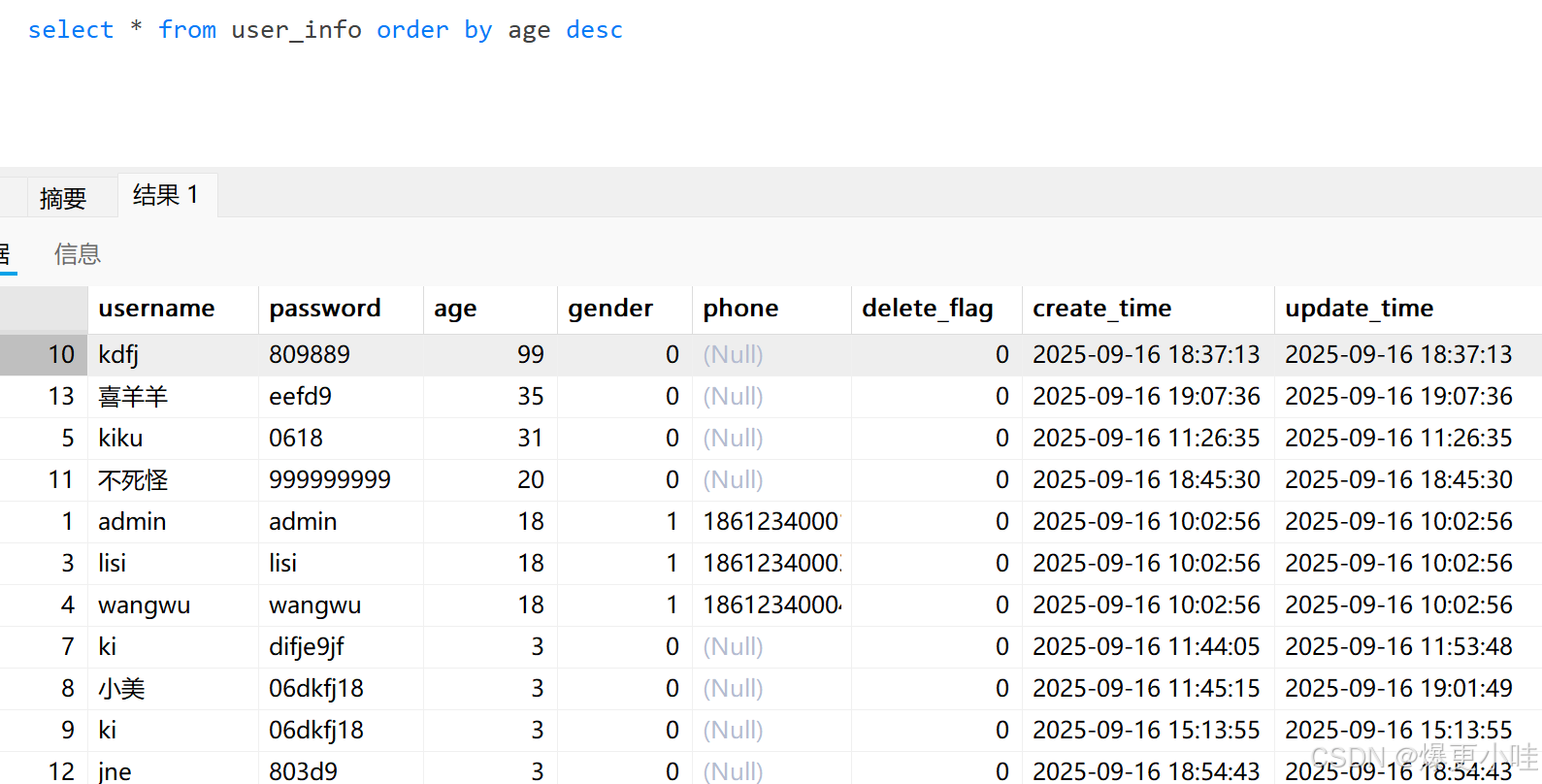
我们用sql语句按年龄降序排序进行查询,sql语句是这样写的
select * from user_info order by age desc
用#{}的方式
import com.bit.mybatis.model.UserInfo;
import org.apache.ibatis.annotations.*;
import java.util.List;


@Mapper
public interface UserInfoMapper {

    @Select("select * from user_info order by age #{order}")
    List<UserInfo> selectByOrder(String order);
}
package com.bit.mybatis.mapper;

import com.bit.mybatis.model.UserInfo;
import org.junit.jupiter.api.AfterEach;
import org.junit.jupiter.api.BeforeEach;
import org.junit.jupiter.api.Test;
import org.springframework.beans.factory.annotation.Autowired;
import org.springframework.boot.test.context.SpringBootTest;

import static org.junit.jupiter.api.Assertions.*;
@SpringBootTest
class UserInfoMapperTest {

    @Autowired
    private UserInfoMapper userInfoMapper;

    @Test
    void selectByOrder() {
        System.out.println(userInfoMapper.selectByOrder("desc"));
    }
}
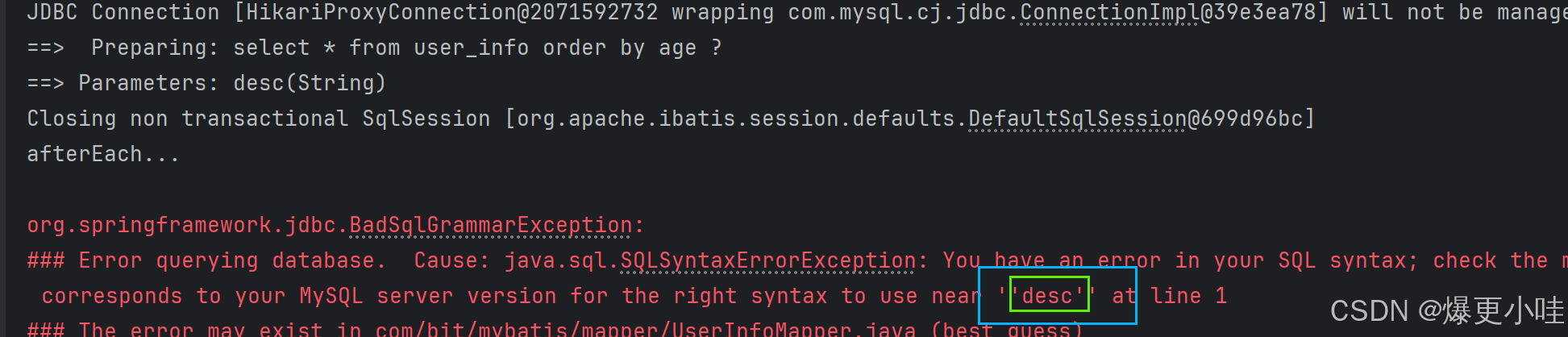 因为用#{}的方式传递String类型参数,它自动给参数加上了引号,
所以导致这里sql语句成了
select * from user_info order by age 'desc',sql语句不正确导致查询失败。
所以这里我们就要用${}的方式来传参,因为该种方式不手动添加引号是不会有引号的。
    @Select("select * from user_info order by age ${order}")
    List<UserInfo> selectByOrder(String order);
sql语句正确,查询成功。
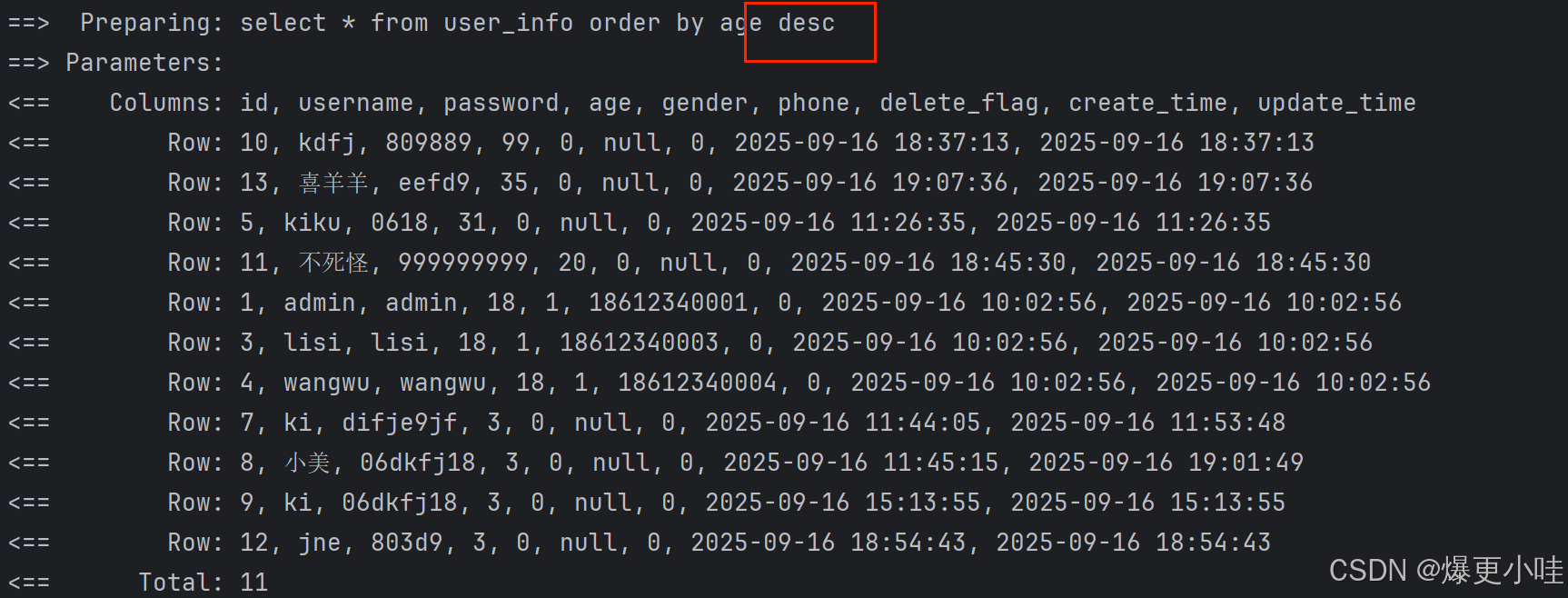
但是我们使用${}的方式要注意sql注入的问题,所以我们可以把参数类型换成枚举来规避这个问题,枚举值就是 desc 和 asc。
like查询
sql语句:select * from user_info where username like '%i%'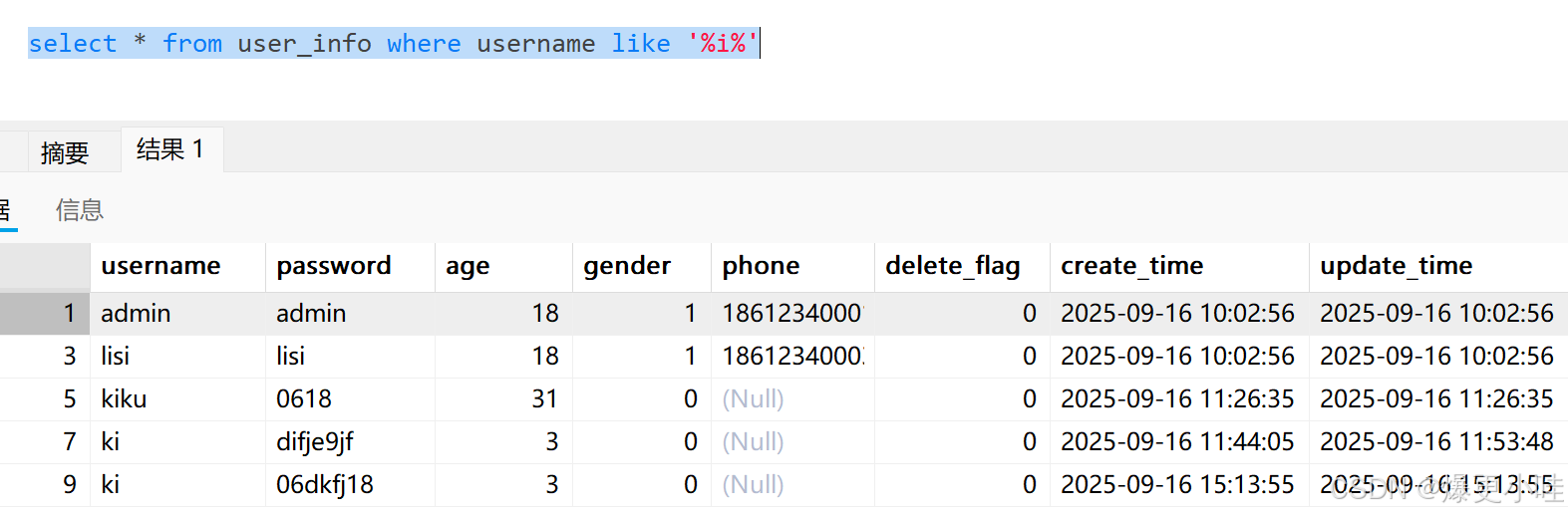
#{}
我们用#{}传参来试一下,
import com.bit.mybatis.model.UserInfo;
import org.apache.ibatis.annotations.*;

import java.util.List;


@Mapper
public interface UserInfoMapper {

    @Select("select * from user_info where username like '%#{name}%'")
    List<UserInfo> selectByLike(String name);
}
import com.bit.mybatis.model.UserInfo;
import org.junit.jupiter.api.AfterEach;
import org.junit.jupiter.api.BeforeEach;
import org.junit.jupiter.api.Test;
import org.springframework.beans.factory.annotation.Autowired;
import org.springframework.boot.test.context.SpringBootTest;
import static org.junit.jupiter.api.Assertions.*;
@SpringBootTest
class UserInfoMapperTest {
@Autowired
private UserInfoMapper userInfoMapper;
@Test
void selectByLike() {
System.out.println(userInfoMapper.selectByLike("i"));
}
}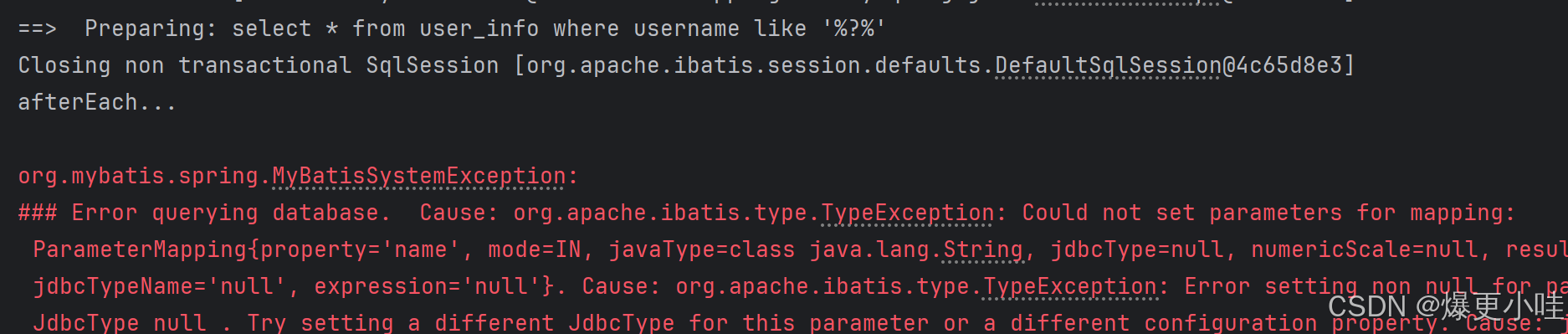 可以看到运行失败了,#{}在sql语句中替换成占位符?,但是因为?在引号中所以成了字符串的一部分,导致参数绑定失败。
所以like查询不能直接用#{}。
${}
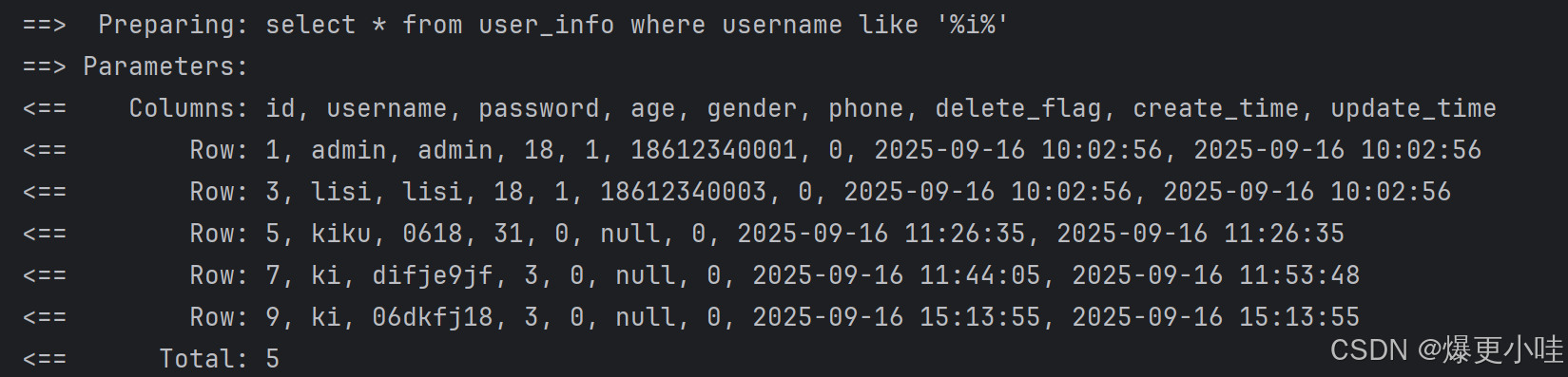
用${}传参 ${}直接替换成参数,虽然能成功查询,但是参数类型是String类型,我们无法规避sql注入的问题,所以也不用${}
@Select("select * from user_info where username like '%${name}%'")
List<UserInfo> selectByLike(String name);
mysql内置函数concat()+#{}传参
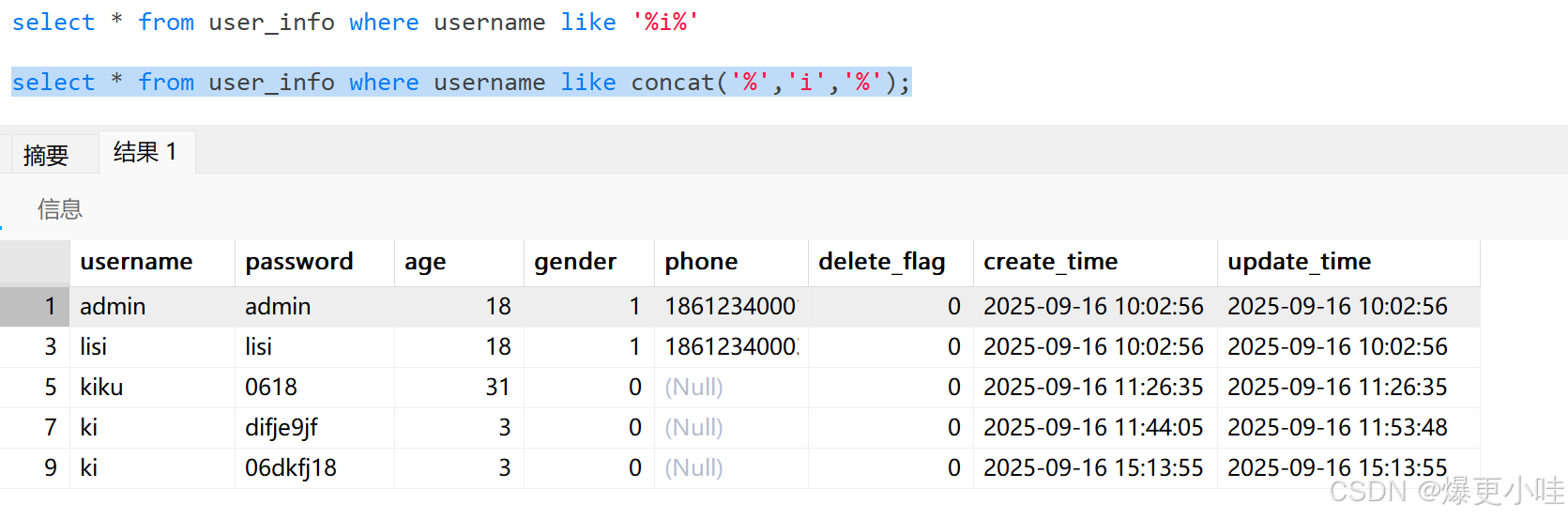
sql语句:select * from user_info where username like concat('%','i','%');
import com.bit.mybatis.model.UserInfo;
import org.apache.ibatis.annotations.*;

import java.util.List;


@Mapper
public interface UserInfoMapper {


    @Select("select * from user_info where username like concat('%',#{name},'%')")
    List<UserInfo> selectByLike(String name);
}
import com.bit.mybatis.model.UserInfo;
import org.junit.jupiter.api.AfterEach;
import org.junit.jupiter.api.BeforeEach;
import org.junit.jupiter.api.Test;
import org.springframework.beans.factory.annotation.Autowired;
import org.springframework.boot.test.context.SpringBootTest;

import static org.junit.jupiter.api.Assertions.*;
@SpringBootTest
class UserInfoMapperTest {

    @Autowired
    private UserInfoMapper userInfoMapper;

    @Test
    void selectByLike() {
        System.out.println(userInfoMapper.selectByLike("i"));
    }
}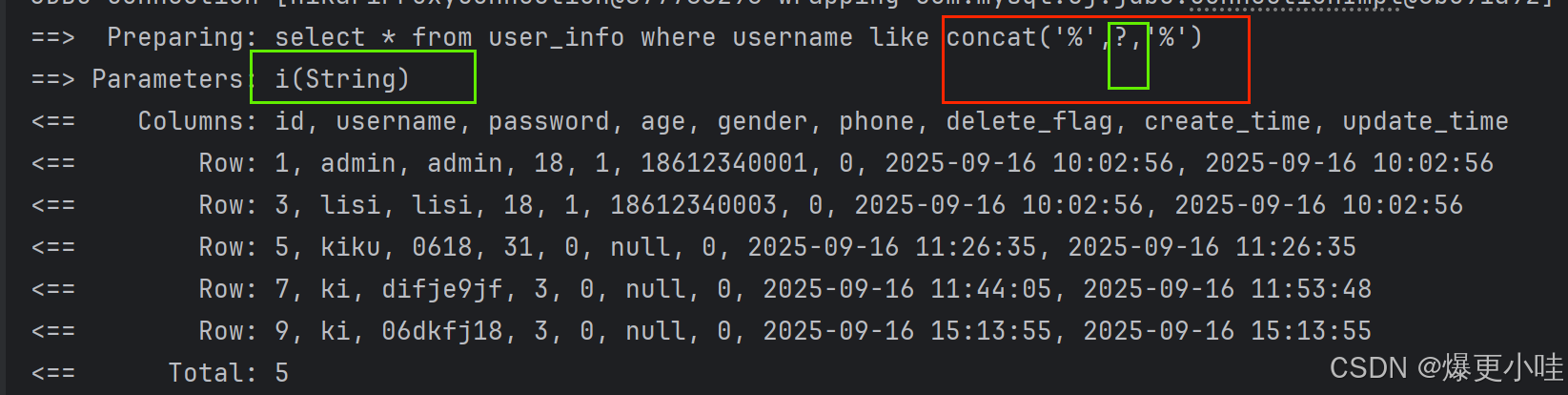
mybatis将#{}替换成占位符?,并自动处理参数绑定 给参数i加上引号变成'i',然后通过mysql内置函数concat来拼接了'%', 'i', '%'这三个字符成了'%i%',
所以SQL语句正确,查询成功。

助力广东及东莞地区开发者,代码托管、在线学习与竞赛、技术交流与分享、资源共享、职业发展,成为松山湖开发者首选的工作与学习平台
更多推荐



 18
18 0
0- 0


 已为社区贡献1条内容

所有评论(0)