uniapp微信小程序获取实时天气数据
·
1.拿到数据之前需要 在 manifest.json中配置微信小程序AppID
2.勾选位置接口,填写描述

3.在 manifest.json 源码视图中 添加("requiredPrivateInfos" : [ "getLocation" ])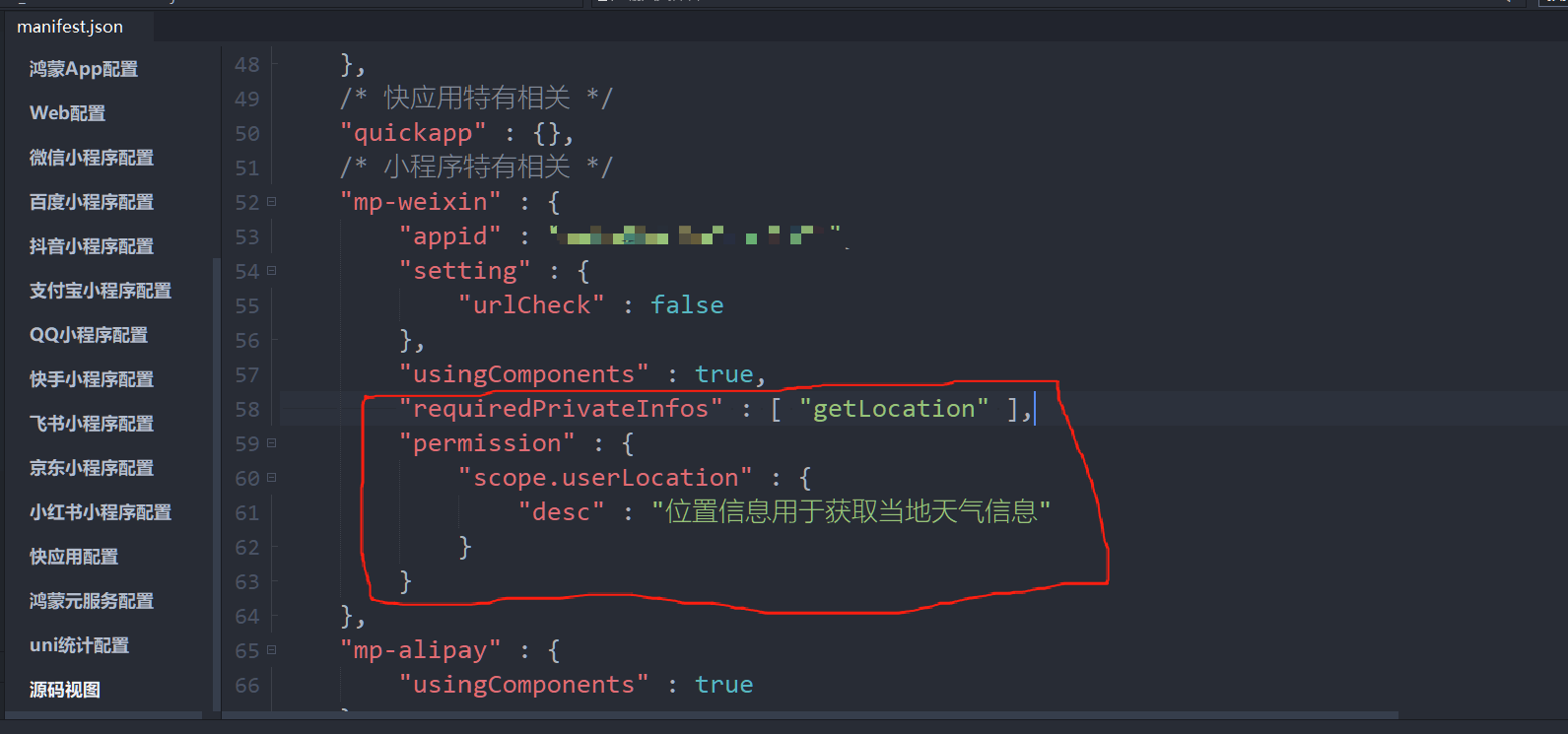
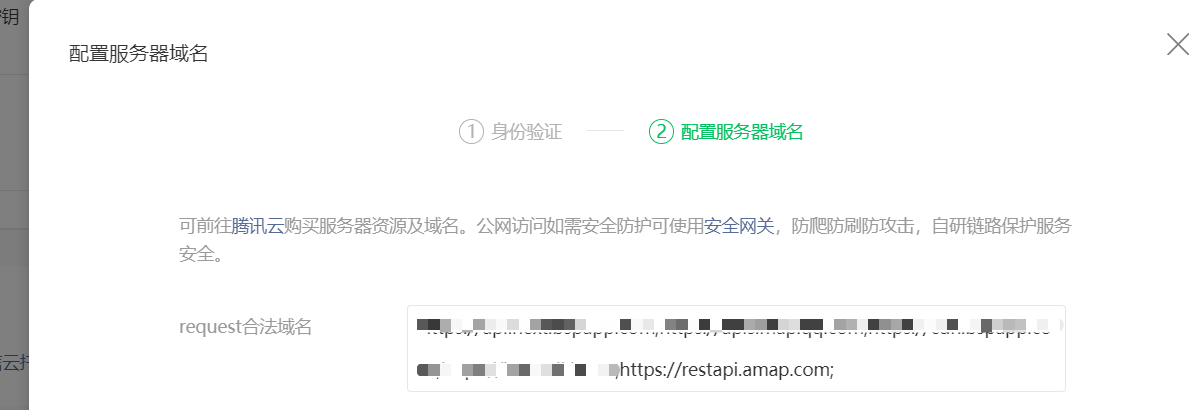
4.在微信公众平台的「开发」-「开发管理」-「开发设置」中添加高德地图API域名
5.在微信小程序里面 配置AppID(如果拿不到数据,可能是因为小程序没有认证,认证之后再试试)
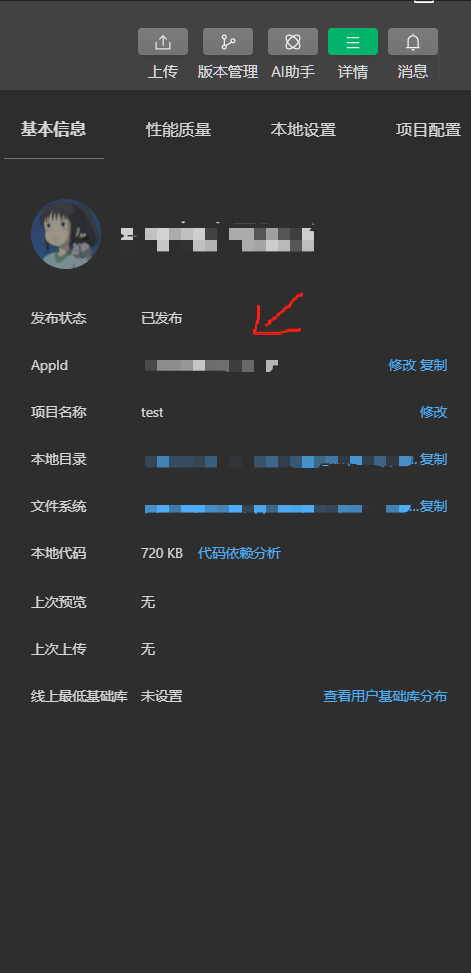
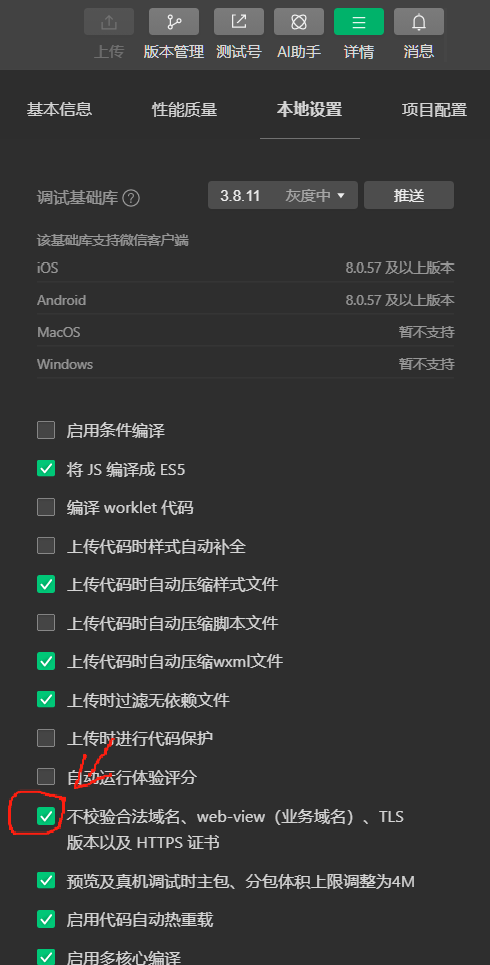
6.使用测试号获取天气数据(未配置合法域名)
解决方法:
-
在 微信开发者工具 中勾选 「不校验合法域名、TLS 版本以及 HTTPS 证书」(本地设置)。
-
这样小程序可以临时绕过域名校验,成功请求高德地图的天气数据。
注意:
-
此方式仅限本地开发和调试,无法用于正式上线。
-
如果测试号尝试真机预览,仍需通过其他方式绕过校验(如手机开启调试模式)。
// utils/weather.js(我是把这段代码封装到utils文件夹下面的weather.js文件中)

# 注意:天气的图片需要自己添加 - 去这里下载:iconfont-阿里巴巴矢量图标库
const KEY = '去高德地图里面创建一个key';
// 天气配置常量
const WEATHER_CONFIG = {
ICONS: {
'晴': '/static/weather/Sunny.svg',
'多云': '/static/weather/Cloudy-Sun.svg',
'阴': '/static/weather/overcast.svg',
'阵雨': '/static/weather/Showers.svg',
'雷阵雨': '/static/weather/Thundershower.svg',
'雨夹雪': '/static/weather/sleet.svg',
'小雨': '/static/weather/LIGHT_RAIN.svg',
'中雨': '/static/weather/Moderate_rain.svg',
'大雨': '/static/weather/heavy-rain.svg',
'暴雨': '/static/weather/Storm.svg',
'大暴雨': '/static/weather/heavy-storm.svg',
'特大暴雨': '/static/weather/severe-storm.svg',
'雪': '/static/weather/Snowy.svg',
'阵雪': '/static/weather/Snow-flurry.svg',
'小雪': '/static/weather/Light-snow.svg',
'中雪': '/static/weather/Moderate-snow.svg',
'大雪': '/static/weather/Heavy-snow.svg',
'暴雪': '/static/weather/snowstorm.svg',
'雾': '/static/weather/fog.svg',
'霾': '/static/weather/haze.svg',
'沙尘暴': '/static/weather/sandstorm.svg'
},
TIPS: {
'晴': '天气晴朗,适合外出活动!',
'多云': '云量较多,记得带伞以防万一~',
'阴': '阴天可能转雨,出门记得带伞',
'阵雨': '有阵雨,出门记得带伞哦',
'雷阵雨': '雷阵雨天气,请注意安全',
'雨夹雪': '雨雪天气,注意防滑保暖',
'小雨': '有小雨,建议携带雨具',
'中雨': '中雨天气,出行请注意安全',
'大雨': '大雨天气,尽量减少外出',
'暴雨': '暴雨天气,请避免外出',
'大暴雨': '大暴雨天气,请注意安全',
'特大暴雨': '特大暴雨,请待在安全场所',
'雪': '下雪啦,注意保暖防滑',
'阵雪': '阵雪天气,注意交通安全',
'小雪': '小雪纷飞,注意保暖',
'中雪': '中雪天气,出行请注意',
'大雪': '大雪天气,注意防寒保暖',
'暴雪': '暴雪天气,请减少外出',
'雾': '雾天能见度低,注意交通安全',
'霾': '雾霾天气,建议佩戴口罩',
'沙尘暴': '沙尘暴天气,请关闭门窗'
},
DEFAULT: {
icon: 'unknown',
tip: '无法获取天气信息',
location: '未知位置',
temperature: '--',
weather: '未知',
welcomeTip: '欢迎光临!'
}
};
// API配置
const API_CONFIG = {
GEOCODE: 'https://restapi.amap.com/v3/geocode/regeo',
WEATHER: 'https://restapi.amap.com/v3/weather/weatherInfo',
CACHE_TIMEOUT: 5 * 60 * 1000, // 5分钟缓存
UPDATE_INTERVAL:20 * 60 *1000 // 20分钟更新间隔
};
/**
* 增强版请求封装
*/
const request = async (url, data, options = {}) => {
try {
const { cache = false } = options;
// 缓存处理
if (cache) {
const cacheKey = `${url}_${JSON.stringify(data)}`;
const cachedData = uni.getStorageSync(cacheKey);
if (cachedData && Date.now() - cachedData.timestamp < API_CONFIG.CACHE_TIMEOUT) {
return cachedData.data;
}
}
const res = await new Promise((resolve, reject) => {
uni.request({
url,
data,
success: (res) => {
if (res.statusCode === 200 && res.data) {
resolve(res.data);
} else {
reject(new Error(`API请求失败: ${res.statusCode}`));
}
},
fail: reject
});
});
// 缓存结果
if (cache) {
const cacheKey = `${url}_${JSON.stringify(data)}`;
uni.setStorageSync(cacheKey, {
data: res,
timestamp: Date.now()
});
}
return res;
} catch (error) {
console.error('请求失败:', url, error);
throw error;
}
};
/**
* 获取高精度定位
*/
const getPreciseLocation = async () => {
try {
// 先检查权限
const authStatus = await new Promise(resolve => {
uni.getSetting({
success: (res) => resolve(res.authSetting['scope.userLocation']),
fail: () => resolve(false)
});
});
if (!authStatus) {
await new Promise((resolve, reject) => {
uni.authorize({
scope: 'scope.userLocation',
success: resolve,
fail: reject
});
});
}
// 获取高精度位置
return await new Promise((resolve, reject) => {
uni.getLocation({
type: 'gcj02',
isHighAccuracy: true,
altitude: false,
success: resolve,
fail: (err) => {
console.error('高精度定位失败,尝试普通定位:', err);
// 降级处理
uni.getLocation({
type: 'gcj02',
success: resolve,
fail: reject
});
}
});
});
} catch (error) {
console.error('定位获取失败:', error);
throw new Error('获取位置信息失败,请检查定位权限');
}
};
/**
* 逆地理编码(获取位置信息)
*/
const getLocationInfo = async (longitude, latitude) => {
try {
const data = await request(
API_CONFIG.GEOCODE,
{
key: KEY,
location: `${longitude},${latitude}`
},
{ cache: true } // 地理信息可缓存
);
if (!data?.regeocode?.addressComponent) {
throw new Error("逆地理编码失败:无效响应数据");
}
const address = data.regeocode.addressComponent;
return {
province: address.province || '',
city: address.city || address.province || '', // 直辖市city可能为空
district: address.district || '',
adcode: address.adcode || '',
longitude,
latitude,
formattedAddress: data.regeocode.formatted_address || ''
};
} catch (error) {
console.error('获取位置信息失败:', error);
throw error;
}
};
/**
* 获取天气信息
*/
const getWeather = async (adcode) => {
try {
const data = await request(
API_CONFIG.WEATHER,
{
key: KEY,
city: adcode,
extensions: "base"
},
{ cache: true } // 天气数据可缓存
);
if (data?.status !== "1" || !data?.lives?.length) {
throw new Error("天气数据无效");
}
const weatherInfo = data.lives[0];
return {
weather: weatherInfo.weather,
temperature: weatherInfo.temperature,
windDirection: weatherInfo.winddirection,
humidity: weatherInfo.humidity,
reportTime: weatherInfo.reporttime
};
} catch (error) {
console.error('获取天气失败:', error);
throw error;
}
};
/**
* 根据天气获取图标和提示语
*/
const getWeatherIconAndTip = (weather) => {
if (!weather) return WEATHER_CONFIG.DEFAULT;
// 匹配最相似的天气关键词
const matchedKey = Object.keys(WEATHER_CONFIG.ICONS).find(key =>
weather.includes(key)
) || 'unknown';
return {
icon: WEATHER_CONFIG.ICONS[matchedKey] || WEATHER_CONFIG.DEFAULT.icon,
tip: WEATHER_CONFIG.TIPS[matchedKey] || WEATHER_CONFIG.DEFAULT.tip
};
};
/**
* 主入口:获取定位和天气数据
*/
export const getWeatherData = async (options = {}) => {
const { forceRefresh = false } = options;
try {
// 1. 获取用户经纬度
const { latitude, longitude } = await getPreciseLocation();
// 2. 获取位置信息
const locationInfo = await getLocationInfo(longitude, latitude);
// 3. 获取天气数据
const weatherData = await getWeather(locationInfo.adcode);
// 4. 获取天气图标和标语
const { icon, tip } = getWeatherIconAndTip(weatherData.weather);
// 5. 合并所有数据
return {
location: `${locationInfo.province} ${locationInfo.city} ${locationInfo.district}`,
fullAddress: locationInfo.formattedAddress,
...weatherData,
weatherIcon: icon,
weatherTip: tip,
welcomeTip: `欢迎来到${locationInfo.district}!${tip}`,
timestamp: Date.now(),
coordinates: {
longitude,
latitude
}
};
} catch (error) {
console.error("获取天气数据失败:", error);
return {
...WEATHER_CONFIG.DEFAULT,
error: error.message
};
}
};
在vue组件中调用上面封装好的weather.js文件
// 在vue组件中调用上面封装好的weather.js文件
import { getWeatherData } from '../../utils/weather'
// 天气
const getLocation=async()=>{
const res=await getWeatherData()
}
getLocation()
助力广东及东莞地区开发者,代码托管、在线学习与竞赛、技术交流与分享、资源共享、职业发展,成为松山湖开发者首选的工作与学习平台
更多推荐



 34
34 0
0- 0


 已为社区贡献1条内容

所有评论(0)