Kubernetes-核心概念Service
Kubernetes核心概念Service
Service作用
使用kubernetes集群运行工作负载时,由于Pod经常处于用后即焚状态,Pod经常被重新生成,因此Pod对应的IP地址也会经常变化,导致无法直接访问Pod提供的服务,Kuberetes中使用了Service来解决这一问题,即在Pod前面使用Service对Pod进行代理,无论Pod怎样变化,只要有Label,就可以让Service能够联系上Pod,把Pod lP地址添加到Service对应的端点列表(Endpoints)实现对Pod IP跟踪,进而实现通过Service访问Pod目的。
-
通过service为pod客户端提供访问pod方法,即可客户端访问pod入口
-
通过标签动态感知podIP地址变化等
-
防止pod失联
-
定义访问pod访问策略
-
通过label-selector相关联
-
通过**Service实现Pod的负载均衡(TCP/UDP4层)**
-
底层实现由kube-proxy通过userspace、iptables、ipvs三种代理模式
kube-proxy三种代理模式
-
kubernetes集群中有三层网络,一类是真实存在的,例如Node Network、Pod Network,提供真实IP地址;一类是虚拟的,例如ClusterNetwork或Service Network,提供虚拟IP地址,不会出现在接口上,仅会出现在Service当中
-
kube-proxy始终watch(监控)kube-apiserver上关于Service相关的资源变动状态,一旦获取相关信息kube:proxy都要把相关信息转化为当前节点之上的,能够实现Service资源调度到特定Pod之上的规则,进而实现访问Service就能够获取Pod所提供的服务
-
kube-proxy三种代理模式:userspace模式、iptables模式、ipvs模式
userspace模式
userspace 模式是 kube-proxy 使用的第一代模式,该模式在 kubernetes v1.0 版本开始支持使用。
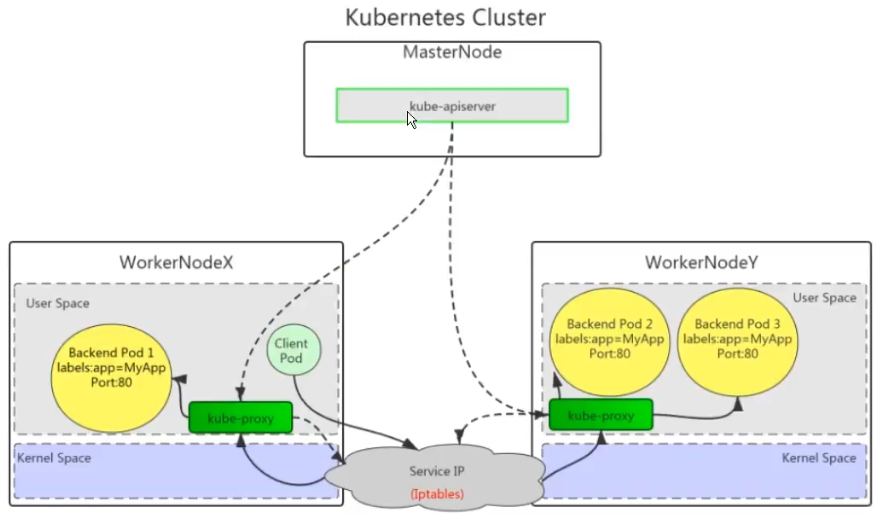
userspace 模式的实现原理图示如下:
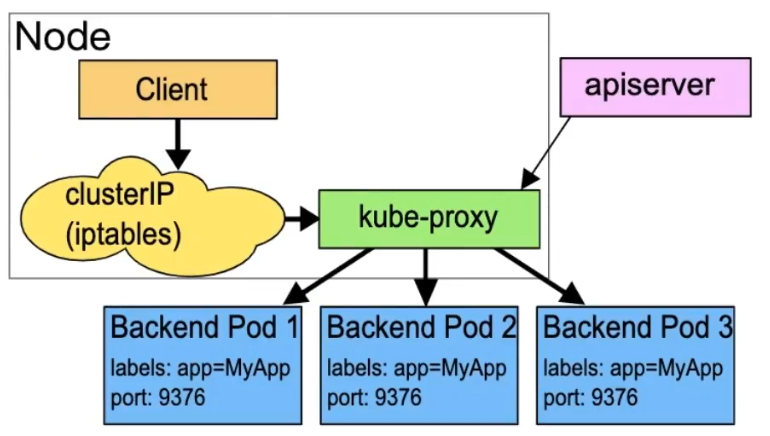
kube-proxy会为每个 Service 随机监听一个端口(proxyport),并增加一条 iptables规则。所以通过ClusterlP:Port 访问 Service 的报文都redirect 到 proxy port,kube-proxy 从它监听的 proxy port 收到报文以后,走 round robin(默认)或是 session affinity(会活亲和力,即同client IP 都走同一链路给同一pod 服务),分发给对应的 pod。
由于 userspace 模式会造成所有报文都走一遍用户态(也就是Service 请求会先从用户空间进入内核iptables,然后再回到用户空间,由kube-proxy 完成后端 Endpoints 的选择和代理工作),需要在内核空间和用户空间转换,流量从用户空间进出内核会带来性能损耗,所以这种模式效率低、性能不高,不推荐使用。
iptables模式
iptables 模式是 kube-proxy使用的第二代模式,该模式在 kubernetes v1.1版本开始支持,从v1.2 版本开始成为 kube-proxy 的默认模式。
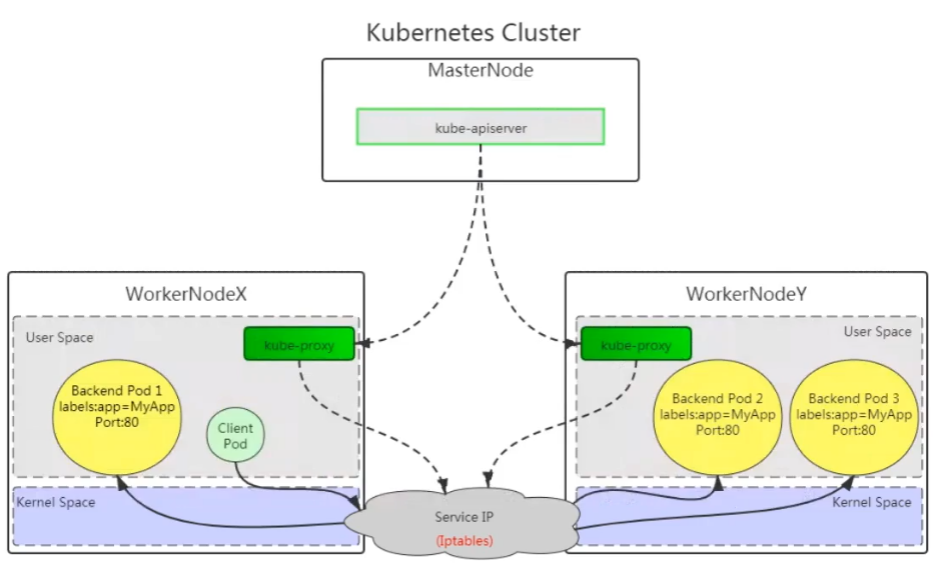
iptables 模式的负载均衡模式是通过底层 netfilter/iptables 规则来实现的,通过 informer 机制 Watch接口实时跟踪 Service 和 Endpoint 的变更事件,并触发对 iptables 规则的同步更新。
iptables 模式的实现原理图示如下:
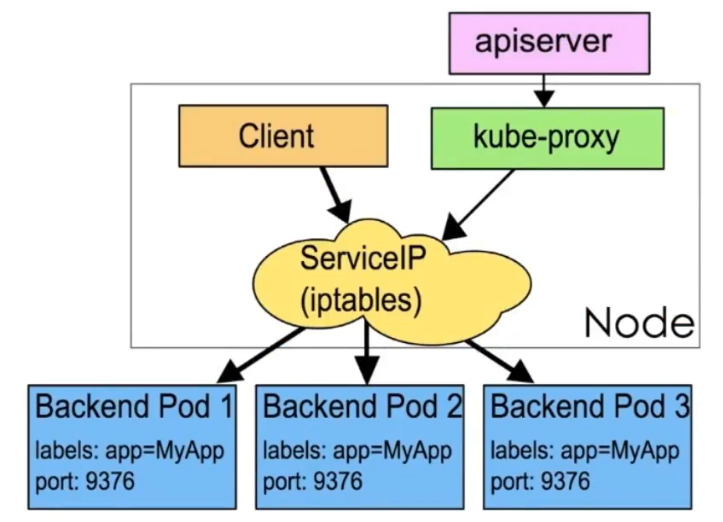
通过图示可以发现在 iptables模式下,kube proxy只是作为 controller,而不是server,真正服务的是内核的 netfilter,体现在用户态的是 iptables。所以整体的效率会比 userspace 模式高。
ipvs模式
ipvs 模式被 kube-proxy采纳为第三代模式,模式在 kubernetes v1.8 版本开始引入,在 v1.9 版本中处于 beta 阶段,在 v1.11 版本中正式开始使用。
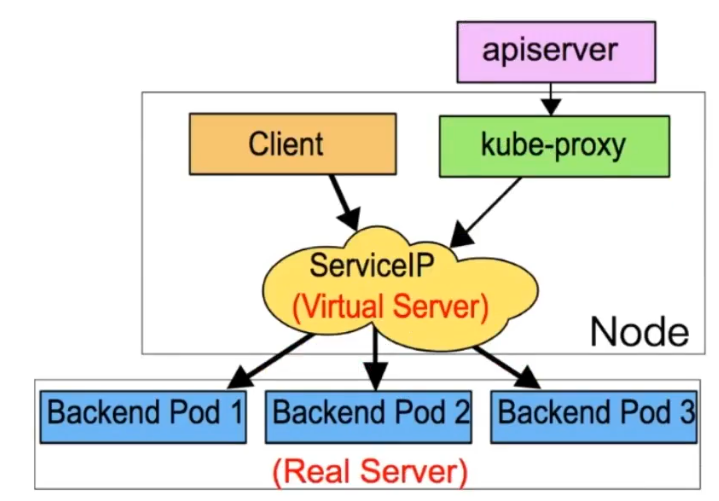
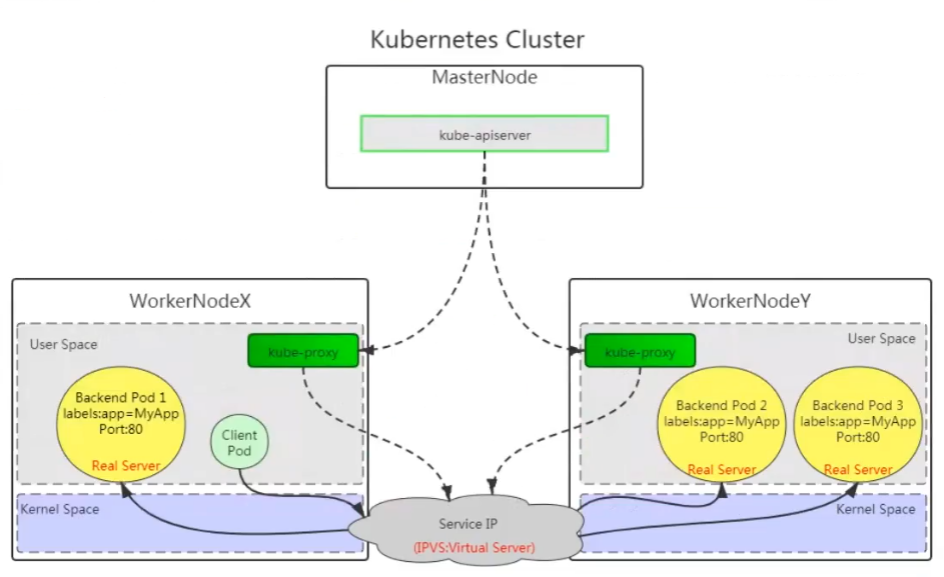
ipvs(iP Virtual Server)实现了传输层负载均衡,也就是4层交换,作为 Linux 内核的一部分。ipvs运行在主机上,在真实服务器前充当负载均衡器。ipvs 可以将基于 TCP和 UDP 的服务请求转发到真实服务器上,并使真实服务器上的服务在单个IP 地址上显示为虚拟服务。
ipvs 模式的实现原理图示如下:
ipvs 和 iptables 都是基于 netfilter 的,那么ipvs 模式有哪些更好的性能呢?
- ipvs 为大型集群提供了更好的可拓展性和性能
- ipvs 支持比 iptables 更复杂的负载均衡算法(包括:最小负载、最少连接、加权等)
- ipvs 支持服务器健康检查和连接重试等功能
- 可以动态修改 ipset的集合,即使iptables 的规则正在使用这个集合
ipvs 依赖于 iptables。ipvs 会使用 iptables 进行包过滤、airpin-masquerade tricks(地址伪装)、SNAT等功能,但是使用的是 iptables 的扩展ipset,并不是直接调用 iptables 来生成规则链。通过 ipset 来存储需要 DROP或 masquerade 的流量的源或目标地址,用于确保iptables 规则的数量是恒定的,这样我们就不需要关心有多少 Service 或是 Pod 了。
使用 ipset 相较于 iptables有什么优点呢?iptables 是线性的数据结构,而ipset引入了带索引的数据结构,当规则很多的时候,ipset 依然可以很高效的查找和匹配。可以将 ipset 简单理解为一个IP(段)的集合,这个集合的内容可以是IP 地址、IP 网段、端口等,iptables 可以直接添加规则对这个“可变的集合进行操作”,这样就可以大大减少iptables规则的数量,从而减少性能损耗。
举一个例子,如果我们要禁止成千上万个IP访问我们的服务器,如果使用 iptables 就需要一条一条的添加规则,这样会在 iptables 中生成大量的规则:如果用ipset 就只需要将相关的IP 地址(网段)加入到 ipset集合中,然后只需要设置少量的 iptables 规则就可以实现这个目标。
下面的表格是ipvs模式下维护的ipset表集合:
| 设置名称 | 成员 | 用法 |
|---|---|---|
| KUBE-CLUSTER-IP | 所有服务 IP + 端口 | 在 masquerade-all=true 或 custerCIDR 指定的情况下对 Service Cluster IP地址进行伪装,解决数据包欺骗问题 |
| KUBE-LOOP-BACK | 所有服务 IP + 端口 + IP | 解决数据包欺骗问题 |
| KUBE-EXTERNAL-IP | 服务外部 IP + 端口 | 将数据包伪装成 Service 的外部 IP 地址 |
| KUBE-LOAD-BALANCER | 负载均衡器入口 IP + 端口 | 将数据包伪装成 Load Balancer 类型的 Service |
| KUBE-LOAD-BALANCER-LOCAL | 负载均衡器入口 IP + 端口以及externalTrafficPolicy=local | 接受数据包的 Load Balancer externalTrafficPolicy=local |
| KUBE-LOAD-BALANCER-FW | 负载均衡器入口 IP + 端口以及loadBalancerSourceRanges | 使用指定的loadBalancerSourcceRanges 丢弃 Load Balancer 类型 Service 的数据包 |
| KUBE-LOAD-BALANCER-CIDR | 负载均衡器入口 IP + 端口 + 源CIDR | 接受 Load Balancer 类型 Service 的数据包,并指定loadBalancerSourceRanges |
| KUBE-NODE-PORT-TCP | NodePort 类型服务 TCP 端口 | 将数据包伪装成 NodePort(TCP) |
| KUBE-NODE-PORT-LOCAL-TCP | NodePort 类型服务 TCP 端口,带有externalTrafficPolicy=local | 接受数据包到 NodePort 服务,使用 externalTrafficPolicy=local |
| KUBE-NODE-PORT-UDP | NodePort 类型服务 UDP 端口 | 将数据包伪装成 NodePort(UDP) |
| KUBE-NODE-PORT-LOCAL-UDP | NodePort 类型服务 UDP 端口,使用externalTrafficPolicy=local | 接受数据包到 NodePort 服务,使用 externalTrafficPolicy=local |
iptables与ipvs对比
-
iptables
-
工作在内核空间
-
优点
- 灵活,功能强大(可以在数据包不同阶段对包进行操作)
-
缺点
- 表中规则过多时,响应变慢,即规则遍历匹配和更新,呈线性延时
-
-
ipvs
-
工作在内核空间
-
优点
- 转发效率高
- 调度算法丰富:rr,wrr,lc,wlc,ip hash等
-
缺点
- 内核支持不全,低版本内核不能使用,需要升级到4.0或5.0以上。
-
-
使用iptables与ipvs时机
-
1.10版本之前使用iptables(1.1版本之前使用UserSpace进行转发)
-
1.11版本之后同时支持iptables与ipvs,默认使用ipvs,如果ipvs模块没有加载时,会自动降级至iptables
-
Service类型及参数
类型
-
ClusterIP
- 默认,分配一个集群内部可以访问的虚拟IP
-
NodePort
-
在每个Node上分配一个端口作为外部访问入口
-
nodePort端口范围为:30000-32767
-
-
LoadBalancer
- 工作在特定的Cloud Provider上,例如Google Cloud,AWS,OpenStack
-
ExternalName
- 表示把集群外部的服务引入到集群内部中来,即实现了集群内部pod和集群外部的服务进行通信
参数
-
port:访问service使用的端口
-
targetPort:Pod中容器端口
-
nodePort:通过Node实现外网用户访问k8s集群内service(30000-32767)
-
containerPort:容器端口
Service资源
Service的创建在工作中有两种方式,一是命令行创建,二是通过资源清单文件YAML文件创建。
Cluster IP 类型
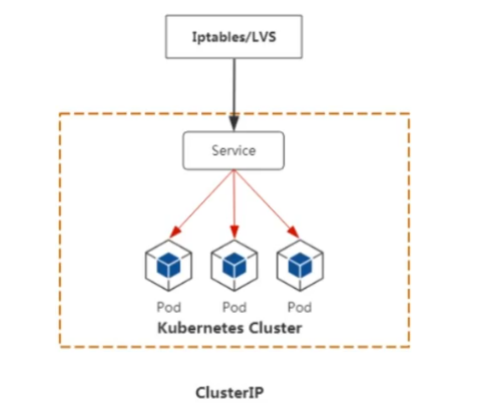
ClusterlP根据是否生成ClusterlP又可分为普通Service和Headless Service。
service两类:
- 普通service:
为Kubernetes的Service分配一个集群内部可访问的固定虚拟IP(Cluster IP),实现集群内的访问,。
- Headless Service
该服务不会分配Cluster Ip,也不通过kube-proxy做反向代理和负载均衡。而是通过DNS提供稳定的网络ID来访问,DNS会将headless service的后端直接解析为pod IP列表。
ClusterIP Service
命令创建service
创建deployment类型的应用
# 创建 yaml
[root@master service]# cat nginx-deployment.yaml
apiVersion: apps/v1
kind: Deployment
metadata:
  name: nginx-server
spec:
  replicas: 2
  selector:
    matchLabels:
      app: nginx
  template:
    metadata:
      labels:
        app: nginx
    spec:
      containers:
        - name: c1
          image: nginx:1.26-alpine
          imagePullPolicy: IfNotPresent
          ports:
            - containerPort: 80
# 应用 yaml
[root@master service]# kubectl apply -f nginx-deployment.yaml
deployment.apps/nginx-server created
# 查看pod
[root@master service]# kubectl get pod -o wide
NAME                            READY   STATUS    RESTARTS   AGE   IP               NODE    NOMINATED NODE   READINESS GATES
nginx-server-5b6d5cd699-ckmd9   1/1     Running   0          31s   10.244.166.177   node1   <none>           <none>
nginx-server-5b6d5cd699-pfb5v   1/1     Running   0          31s   10.244.104.3     node2   <none>           <none>
命令创建clusterIP类型service与Deployment类型应用关联
# 命令创建clusterIP类型service与Deployment类型应用关联
[root@master service]# kubectl expose deployment nginx-server --type=ClusterIP --target-port=80 --port=80
service/nginx-server exposed
# expose:创建service
# deployment:控制器类型
# nginx-server:应用名称,也是service名称
# --type=ClusterIP:指定service类型
# --target-port=80:指定Pod中容器端口
# --port=80:指定service端口


# 查看 service
[root@master service]# kubectl get service
NAME           TYPE        CLUSTER-IP     EXTERNAL-IP   PORT(S)   AGE
kubernetes     ClusterIP   10.96.0.1      <none>        443/TCP   8d
nginx-server   ClusterIP   10.109.5.201   <none>        80/TCP    6s


# 进入容器修改主页内容
[root@master service]# kubectl exec -it nginx-server-5b6d5cd699-pfb5v -- /bin/sh
/ # echo "this is nginx web2" > /usr/share/nginx/html/index.html
[root@master service]# kubectl exec -it nginx-server-5b6d5cd699-ckmd9 -- /bin/sh
/ # echo "this is nginx web1" > /usr/share/nginx/html/index.html

# 验证负载均衡功能
[root@master service]# curl 10.109.5.201
this is nginx web1
[root@master service]#
[root@master service]# curl 10.109.5.201
this is nginx web2
[root@master service]# curl 10.109.5.201
this is nginx web1
[root@master service]# curl 10.109.5.201
this is nginx web2
YAML文件创建Service
# 编写 yaml
[root@master service]# cat nginx-deployment.yaml
apiVersion: apps/v1
kind: Deployment
metadata:
  name: nginx-server
spec:
  replicas: 2
  selector:
    matchLabels:
      app: nginx
  template:
    metadata:
      labels:
        app: nginx
    spec:
      containers:
        - name: c1
          image: nginx:1.26-alpine
          imagePullPolicy: IfNotPresent
          ports:
            - containerPort: 80
---
apiVersion: v1
kind: Service
metadata:
  name: nginx-svc
spec:
  type: ClusterIP
  ports:
    - protocol: TCP                  # 指定协议
      port: 80
      targetPort: 80
  selector:
    app: nginx
# 应用 yaml
[root@master service]# kubectl apply -f nginx-deployment.yaml
deployment.apps/nginx-server unchanged
service/nginx-svc created
# 验证 service
[root@master service]# kubectl get svc
NAME         TYPE        CLUSTER-IP       EXTERNAL-IP   PORT(S)   AGE
kubernetes   ClusterIP   10.96.0.1        <none>        443/TCP   9d
nginx-svc    ClusterIP   10.100.204.158   <none>        80/TCP    44s
# 访问验证
[root@master service]# curl 10.100.204.158
<!DOCTYPE html>
<html>
<head>
<title>Welcome to nginx!</title>
<style>
html { color-scheme: light dark; }
body { width: 35em; margin: 0 auto;
font-family: Tahoma, Verdana, Arial, sans-serif; }
</style>
</head>
<body>
<h1>Welcome to nginx!</h1>
<p>If you see this page, the nginx web server is successfully installed and
working. Further configuration is required.</p>

<p>For online documentation and support please refer to
<a href="http://nginx.org/">nginx.org</a>.<br/>
Commercial support is available at
<a href="http://nginx.com/">nginx.com</a>.</p>

<p><em>Thank you for using nginx.</em></p>
</body>
</html>
总结:Cluster IP 可以直接通过集群Service IP地址进行后端访问
Headless Service
普通的clusterIP service是service name解析为cluster ip,然后cluster ip对应到后面pod ip。
headless service是指service name直接解析为后面的pod ip
# 创建 Deployment 资源文件
[root@master service]# cat nginx-deployment.yaml
apiVersion: apps/v1
kind: Deployment
metadata:
  name: nginx-server
spec:
  replicas: 2
  selector:
    matchLabels:
      app: nginx
  template:
    metadata:
      labels:
        app: nginx
    spec:
      containers:
        - name: c1
          image: nginx:1.26-alpine
          imagePullPolicy: IfNotPresent
          ports:
            - containerPort: 80
# 应用资源文件
[root@master service]# kubectl apply -f nginx-deployment.yaml
deployment.apps/nginx-server created
# 查看pod
[root@master service]# kubectl get pod
NAME                            READY   STATUS    RESTARTS   AGE
nginx-server-5b6d5cd699-5r6qg   1/1     Running   0          46s
nginx-server-5b6d5cd699-hwm9t   1/1     Running   0          46s
创建headless资源文件
# 创建 headless service 的资源文件
[root@master service]# cat headless-service.yaml
apiVersion: v1
kind: Service
metadata:
  name: nginx-headless
spec:
  type: ClusterIP
  clusterIP: None             # 无头服务,没有clusterIP
  ports:
    - protocol: TCP
      port: 80
      targetPort: 80
  selector:
    app: nginx
# 应用 yaml
[root@master service]# kubectl get service nginx-headless
NAME             TYPE        CLUSTER-IP   EXTERNAL-IP   PORT(S)   AGE
nginx-headless   ClusterIP   None         <none>        80/TCP    58s
DNS:
DNS服务监视Kubernetes APl,为每一个Service创建DNS记录用于域名解析
headless service需要DNS来解决访问问题
DNS记录格式为:…svc.cluster.local.
# 查看kube-dns服务的ip
[root@master service]# kubectl get -n kube-system  service kube-dns
NAME       TYPE        CLUSTER-IP   EXTERNAL-IP   PORT(S)                  AGE
kube-dns   ClusterIP   10.96.0.10   <none>        53/UDP,53/TCP,9153/TCP   9d
# 通过DNS服务地址查找无头服务的解析
[root@master service]# dig -t a nginx-headless.default.svc.cluster.local. @10.96.0.10

; <<>> DiG 9.9.4-RedHat-9.9.4-50.el7 <<>> -t a nginx-headless.default.svc.cluster.local. @10.96.0.10
;; global options: +cmd
;; Got answer:
;; ->>HEADER<<- opcode: QUERY, status: NOERROR, id: 24071
;; flags: qr aa rd; QUERY: 1, ANSWER: 2, AUTHORITY: 0, ADDITIONAL: 1
;; WARNING: recursion requested but not available

;; OPT PSEUDOSECTION:
; EDNS: version: 0, flags:; udp: 4096
;; QUESTION SECTION:
;nginx-headless.default.svc.cluster.local. IN A

;; ANSWER SECTION:
nginx-headless.default.svc.cluster.local. 14 IN	A 10.244.166.179
nginx-headless.default.svc.cluster.local. 14 IN	A 10.244.104.5

;; Query time: 0 msec
;; SERVER: 10.96.0.10#53(10.96.0.10)
;; WHEN: 三 8月 06 16:21:09 CST 2025
;; MSG SIZE  rcvd: 181
# 根据查看到的后端进行访问
[root@master service]# curl 10.244.104.5
<!DOCTYPE html>
<html>
<head>
<title>Welcome to nginx!</title>
<style>
html { color-scheme: light dark; }
body { width: 35em; margin: 0 auto;
font-family: Tahoma, Verdana, Arial, sans-serif; }
</style>
</head>
<body>
<h1>Welcome to nginx!</h1>
<p>If you see this page, the nginx web server is successfully installed and
working. Further configuration is required.</p>

<p>For online documentation and support please refer to
<a href="http://nginx.org/">nginx.org</a>.<br/>
Commercial support is available at
<a href="http://nginx.com/">nginx.com</a>.</p>

<p><em>Thank you for using nginx.</em></p>
</body>
</html>


# 在集群内创建Pod进行解析访问
[root@master service]# kubectl run -it centos --image=centos:7 --image-pull-policy=IfNotPresent
If you don't see a command prompt, try pressing enter.
[root@centos /]# curl http://nginx-headless.default.svc.cluster.local
<!DOCTYPE html>
<html>
<head>
<title>Welcome to nginx!</title>
<style>
html { color-scheme: light dark; }
body { width: 35em; margin: 0 auto;
font-family: Tahoma, Verdana, Arial, sans-serif; }
</style>
</head>
<body>
<h1>Welcome to nginx!</h1>
<p>If you see this page, the nginx web server is successfully installed and
working. Further configuration is required.</p>

<p>For online documentation and support please refer to
<a href="http://nginx.org/">nginx.org</a>.<br/>
Commercial support is available at
<a href="http://nginx.com/">nginx.com</a>.</p>

<p><em>Thank you for using nginx.</em></p>
</body>
</html>
总结:headless service 需要通过dns解析访问后端pod
NodePort类型
# 创建 yaml 资源
[root@master service]# cat nginx-deployment.yaml
apiVersion: apps/v1
kind: Deployment
metadata:
  name: nginx-server
spec:
  replicas: 2
  selector:
    matchLabels:
      app: nginx
  template:
    metadata:
      labels:
        app: nginx
    spec:
      containers:
        - name: c1
          image: nginx:1.26-alpine
          imagePullPolicy: IfNotPresent
          ports:
            - containerPort: 80
---
apiVersion: v1
kind: Service
metadata:
  name: nginx-svc
spec:
  type: NodePort
  ports:
    - protocol: TCP
      nodePort: 31111
      port: 8060
      targetPort: 80
  selector:
    app: nginx
# 应用 yaml 资源
[root@master service]# kubectl apply -f nginx-deployment.yaml
deployment.apps/nginx-server unchanged
service/nginx-svc created
# 验证资源
[root@master service]# kubectl get pod,svc
NAME                                READY   STATUS    RESTARTS   AGE
pod/nginx-server-5b6d5cd699-8zrht   1/1     Running   0          48s
pod/nginx-server-5b6d5cd699-pjbsx   1/1     Running   0          48s

NAME                 TYPE        CLUSTER-IP      EXTERNAL-IP   PORT(S)          AGE
service/kubernetes   ClusterIP   10.96.0.1       <none>        443/TCP          9d
service/nginx-svc    NodePort    10.99.164.191   <none>        8060:31111/TCP   38s
# 内部访问验证
[root@master service]# curl 10.99.164.191:8060
<!DOCTYPE html>
<html>
<head>
<title>Welcome to nginx!</title>
<style>
html { color-scheme: light dark; }
body { width: 35em; margin: 0 auto;
font-family: Tahoma, Verdana, Arial, sans-serif; }
</style>
</head>
<body>
<h1>Welcome to nginx!</h1>
<p>If you see this page, the nginx web server is successfully installed and
working. Further configuration is required.</p>

<p>For online documentation and support please refer to
<a href="http://nginx.org/">nginx.org</a>.<br/>
Commercial support is available at
<a href="http://nginx.com/">nginx.com</a>.</p>

<p><em>Thank you for using nginx.</em></p>
</body>
</html>
# 外部节点验证访问
[root@master service]# curl node1:31111
<!DOCTYPE html>
<html>
<head>
<title>Welcome to nginx!</title>
<style>
html { color-scheme: light dark; }
body { width: 35em; margin: 0 auto;
font-family: Tahoma, Verdana, Arial, sans-serif; }
</style>
</head>
<body>
<h1>Welcome to nginx!</h1>
<p>If you see this page, the nginx web server is successfully installed and
working. Further configuration is required.</p>

<p>For online documentation and support please refer to
<a href="http://nginx.org/">nginx.org</a>.<br/>
Commercial support is available at
<a href="http://nginx.com/">nginx.com</a>.</p>

<p><em>Thank you for using nginx.</em></p>
</body>
</html>

[root@master service]# curl node2:31111
<!DOCTYPE html>
<html>
<head>
<title>Welcome to nginx!</title>
<style>
html { color-scheme: light dark; }
body { width: 35em; margin: 0 auto;
font-family: Tahoma, Verdana, Arial, sans-serif; }
</style>
</head>
<body>
<h1>Welcome to nginx!</h1>
<p>If you see this page, the nginx web server is successfully installed and
working. Further configuration is required.</p>

<p>For online documentation and support please refer to
<a href="http://nginx.org/">nginx.org</a>.<br/>
Commercial support is available at
<a href="http://nginx.com/">nginx.com</a>.</p>

<p><em>Thank you for using nginx.</em></p>
</body>
</html>

助力广东及东莞地区开发者,代码托管、在线学习与竞赛、技术交流与分享、资源共享、职业发展,成为松山湖开发者首选的工作与学习平台
更多推荐



 29
29 0
0- 0


 已为社区贡献1条内容

所有评论(0)